
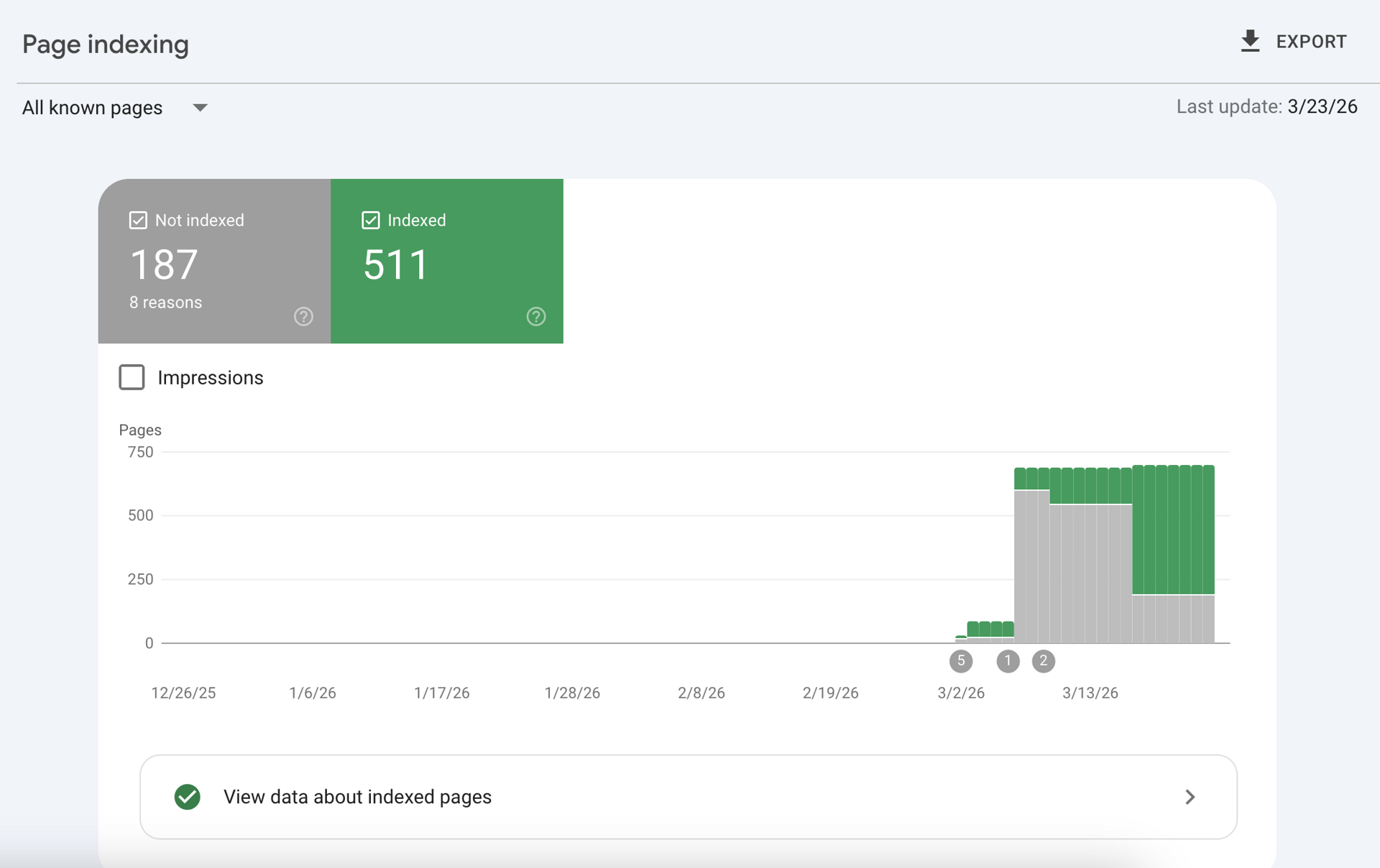
Google Search Console 'Not Indexed' Pages: Why, How to Fix, and When to Remove
Seeing a massive spike of "Not indexed" pages in Google Search Console (GSC) can cause immediate panic for any website owner or SEO professional. When pages aren't indexed, they cannot be served on Google Search, meaning zero organic traffic, zero impressions, and zero revenue for those URLs.
However, a healthy SEO architecture doesn't mandate that 100% of your URLs are indexed. Enterprise technical SEO is about control: understanding why Google rejected a page, knowing how to force indexation for revenue-generating assets, and knowing when to intentionally remove pages to conserve your crawl budget.
This guide breaks down the exact reasons your pages aren't indexing, how to resolve the most stubborn GSC errors, and the strategic thresholds for programmatic and large-scale websites.
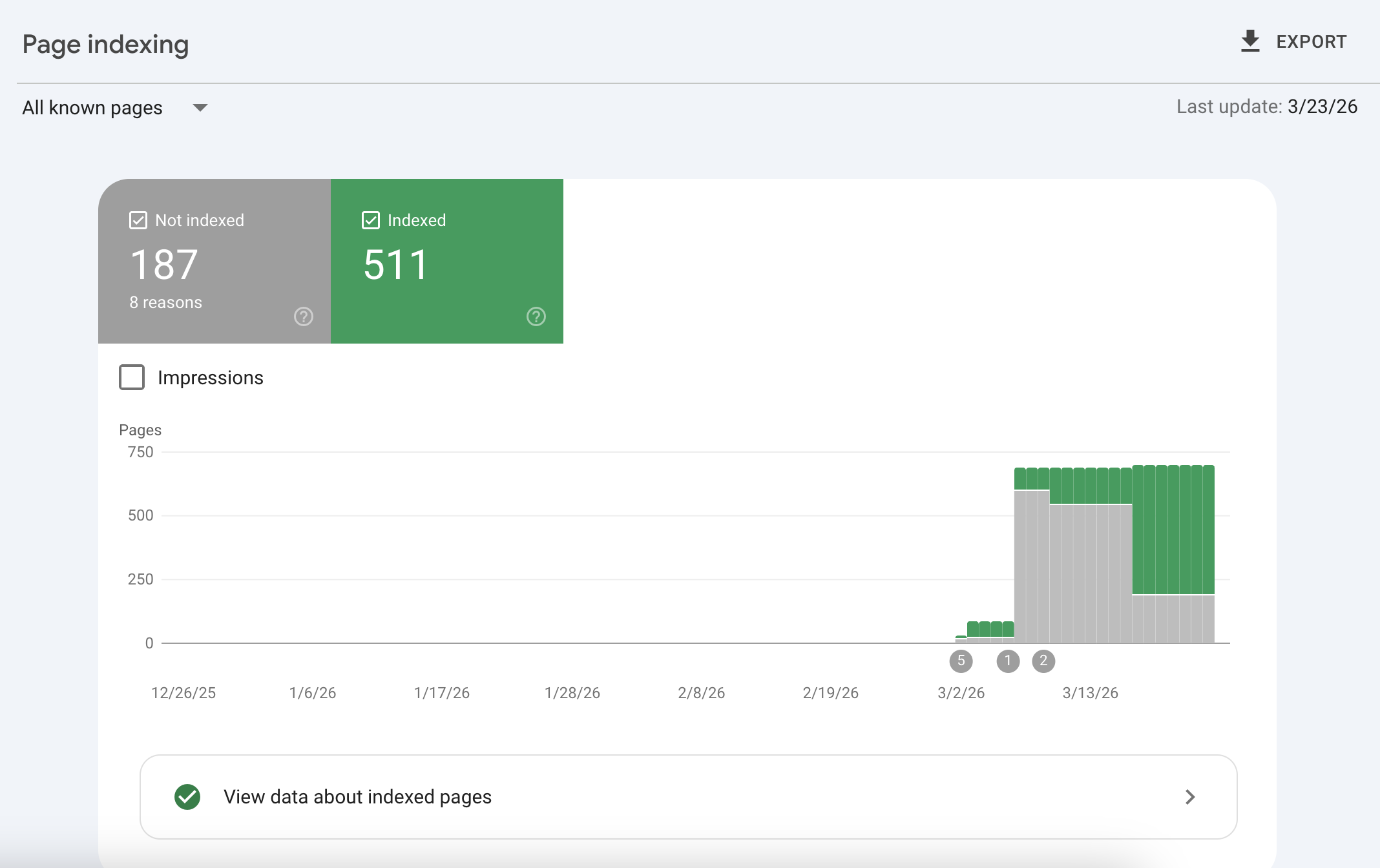
Decoding the "Why Pages Aren't Indexed" Report
When you navigate to Indexing > Pages in Google Search Console, you are presented with a diagnostic table detailing exactly why Googlebot bypassed your URLs.
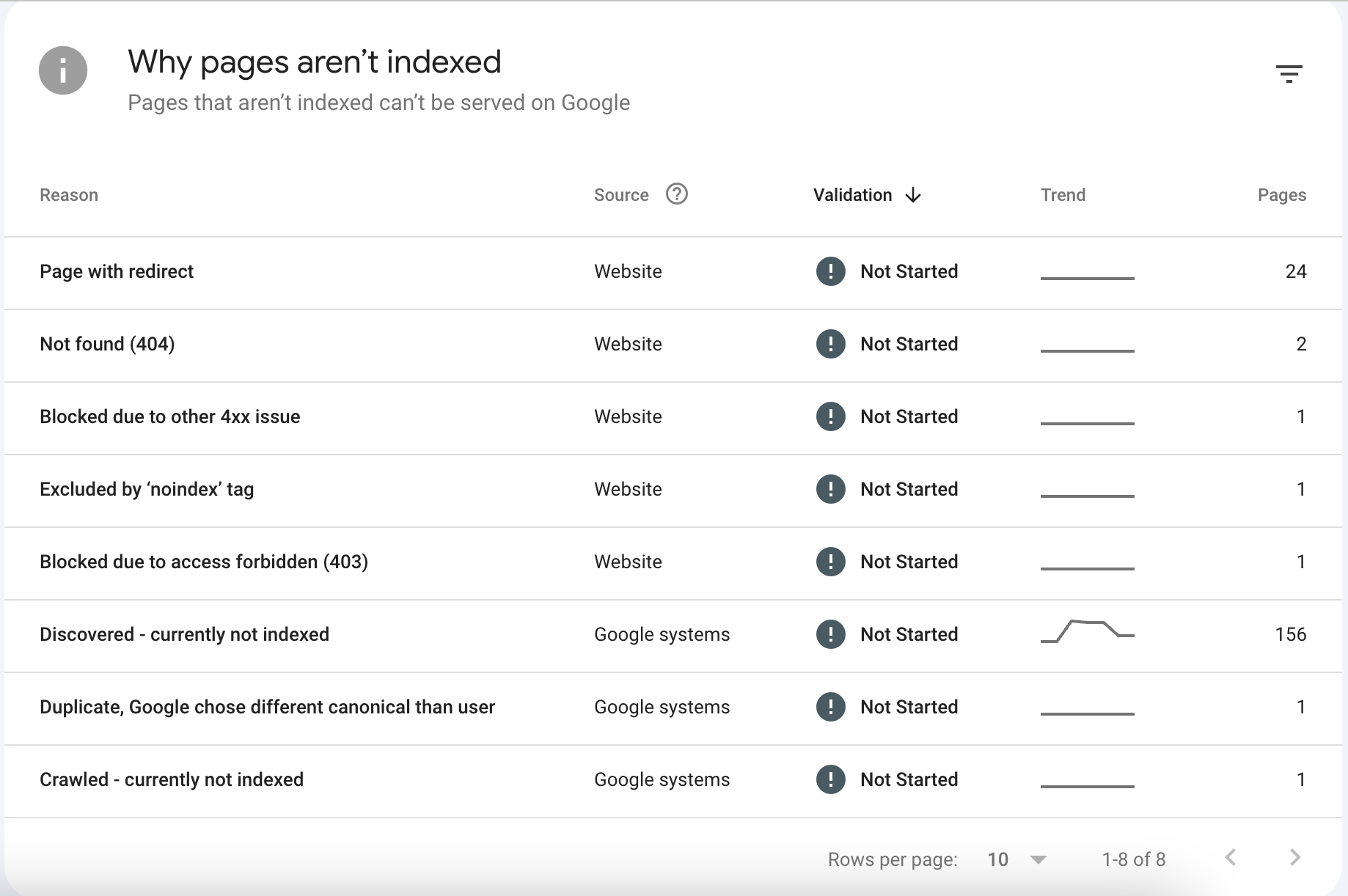
Understanding these reasons is the first step in auditing your site's technical health. Let's break down the most critical errors shown in the report.
1. Discovered - currently not indexed
What it means: Google knows the URL exists (likely through an XML sitemap or an internal link), but the crawler decided not to fetch it yet. Google explicitly states this is often because crawling the page would overload the site's server, so they rescheduled the crawl.
The Reality in 2026: If you see a massive spike in "Discovered - currently not indexed" (like the 156-page spike in the chart below), it is rarely a server overload issue. It is almost always a crawl budget or internal linking architecture problem.
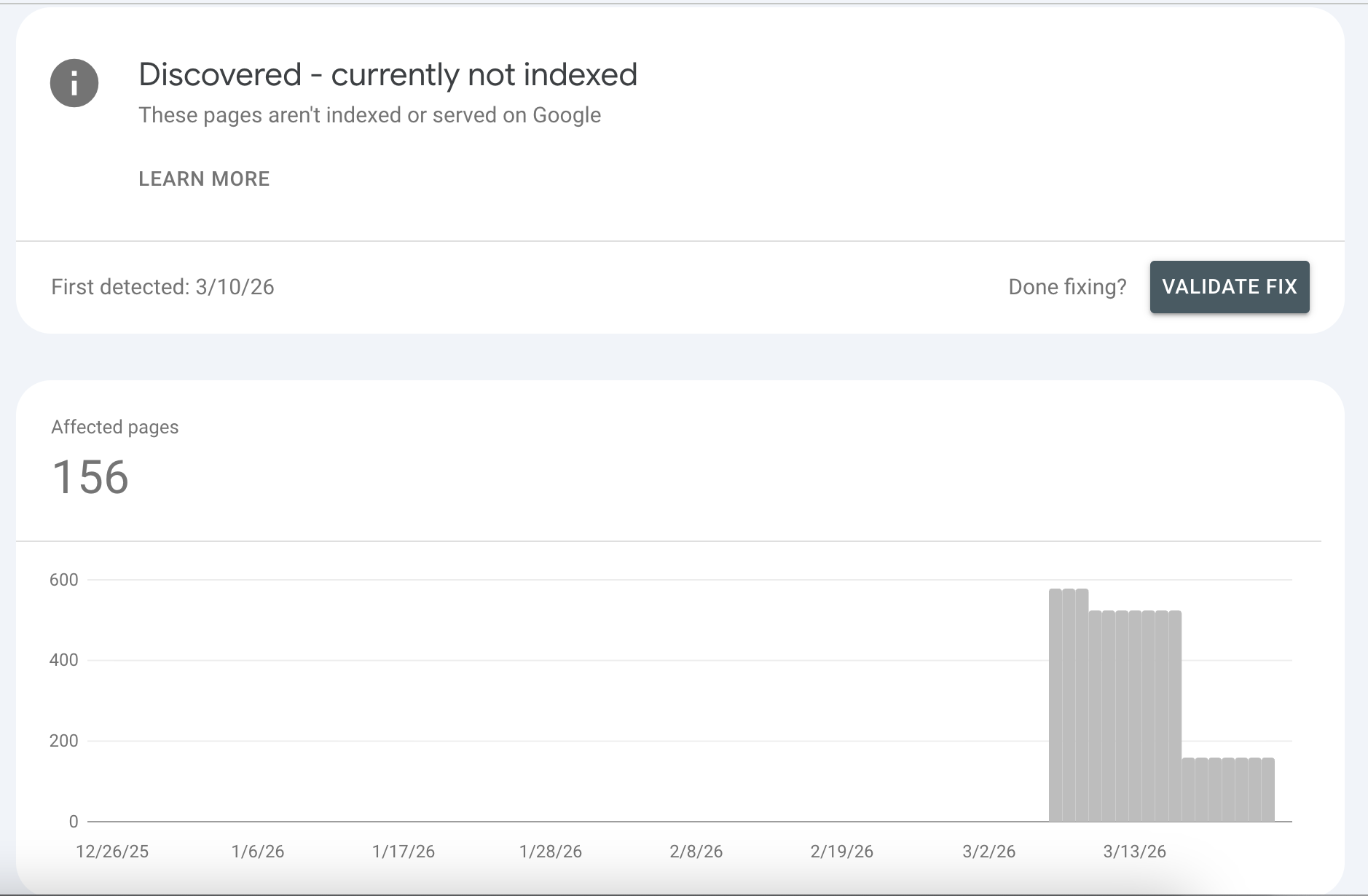
If your website relies heavily on client-side rendering (JavaScript) or suffers from poor server response times (TTFB), Googlebot abandons the queue. Furthermore, if these pages lack sufficient internal links from high-authority hub pages, Google algorithms deem them too unimportant to spend computational resources on.
2. Crawled - currently not indexed
What it means: Googlebot successfully visited the page, downloaded the HTML, but decided not to place it in the index.
The Reality: This is a quality issue. If you are running programmatic SEO or massive localized service pages, encountering this error means your content triggered Google's thin-content filters. You likely violated the "40% Boilerplate Rule"—meaning the page is too similar to other pages on your site and lacks unique, entity-rich value.
3. Duplicate, Google chose different canonical than user
What it means: You declared the page as canonical (or didn't declare one), but Google's algorithms decided a different URL is the true master version of this content.
The Reality: Google ignores your <link rel="canonical"> tags if your content is nearly identical to another page but you are trying to force both to rank. This is rampant in e-commerce (faceted navigation, color/size variations) and programmatic SEO.
4. Page with redirect
What it means: The URL redirects to another page (301 or 302).
The Reality: This is entirely normal and usually requires no fixing. If you migrated a site or changed a URL slug, the old URL will sit in this bucket. It only becomes an issue if a page that should be live is accidentally caught in a redirect chain.
5. Not found (404) & Blocked due to access forbidden (403)
What it means: The server returned a 404 (Not Found) or a 403 (Forbidden) status code.
The Reality: 404s are a natural part of the web. If you deleted a low-quality blog post or a discontinued product, it should 404. However, if the 404 page has dozens of active internal links pointing to it, you are bleeding link equity. 403s usually indicate a firewall (like Cloudflare) aggressively blocking Googlebot IP addresses.
6. Excluded by 'noindex' tag
What it means: Google crawled the page, saw a <meta name="robots" content="noindex"> tag (or an X-Robots-Tag HTTP header), and respected your directive to stay out.
How to Fix 'Not Indexed' Pages
If your revenue-generating pages or programmatic assets are stuck in the "Not indexed" purgatory, follow this technical triage protocol.
Fixing "Discovered - currently not indexed"
This is an architecture and performance issue. To force Google to crawl the queue:
- Improve Internal Linking: Orphan pages do not get crawled. Ensure every indexable page is linked logically within a silo. Build automated HTML sitemaps and link to them from your footer.
- Accelerate Server Response: If your Time to First Byte (TTFB) is over 600ms, Googlebot throttles crawling. Migrate away from slow, database-heavy legacy CMS platforms (like WordPress) to a modern Static Site Generation (SSG) architecture.
- Optimize XML Sitemaps: Break massive sitemaps into smaller, localized chunks (e.g.,
sitemap-services.xml,sitemap-locations.xml). Limit each file to 10,000 URLs to ensure rapid parsing.
Fixing "Crawled - currently not indexed"
This is a content quality issue. You must prove the page deserves to be indexed:
- Reduce Boilerplate: If you have 500 city pages, the core text cannot be identical with just the city name swapped. Inject unique data: local demographics, distinct FAQs, weather APIs, or localized entity references.
- Satisfy Search Intent: Ensure the page answers the primary keyword comprehensively before hitting the user with CTAs.
- Consolidate Thin Content: If you have three separate pages for "Plumbing Repair," "Plumbing Services," and "Plumbing Fixes," Google will refuse to index them all. Consolidate them into one authoritative "Plumbing Services" hub using 301 redirects.
The Indexation Request Protocol
Once you have fixed the underlying issue:
- Paste the URL into the GSC Inspect URL search bar.
- Click Test Live URL to ensure the page is accessible and mobile-friendly.
- Click Request Indexing. (Note: Do not spam this button. Only use it for critical URLs after a definitive fix).
When to Remove or Accept 'Not Indexed' Pages
Novice SEOs obsess over achieving a 100% indexation rate. Enterprise SEOs understand that crawl budget is finite, and strategically blocking Googlebot from low-value pages forces it to focus on your money pages.
If you are running a large site, your target should be an 85% Indexation Target for your core strategy pages. The remaining unindexed URLs on your site should be intentionally blocked.
When to use noindex
You should intentionally add a noindex tag to URLs that provide zero value to organic search, such as:
- Faceted Navigation: E-commerce filters (
?color=red&size=large) generate millions of infinite URL combinations.noindexthem to prevent crawl traps. - Author Archives & Date Archives: These rarely rank and cause massive duplicate content issues.
- Admin & Checkout Pages: Internal application pages,
/cart/, and/checkout/should never be in the Google index.
When to use 404 (Not Found) or 410 (Gone)
Let a page die with a 404 or 410 if:
- The content is entirely outdated and completely irrelevant.
- The page has zero organic traffic, zero impressions, and zero external backlinks.
- Action: Always remove internal links pointing to 404 pages to maintain a clean architecture.
When to use 301 Redirects
You should never 404 a page if it has earned valuable backlinks or historically generated traffic.
- If a product is discontinued, 301 redirect it to the parent category page.
- If you are pruning thin blog posts, merge the best content into a larger hub page and 301 redirect the old URLs to the new hub to preserve the link equity and consolidate topical authority.
The Infrastructure Advantage: Why Architecture Dictates Indexation
The most common reason modern websites fail to index at scale is an over-reliance on Client-Side Rendering (CSR) and bloated legacy platforms like WordPress or heavy page builders.
When Googlebot encounters a JS-heavy page, it downloads the empty HTML shell and places it in a "rendering queue." It may take days or weeks for Google to actually execute the JavaScript, discover your content, and parse your internal links.
At AiPress, we deploy programmatic SEO campaigns using Static Site Generation (SSG) on edge networks. This means the HTML is pre-compiled. When Googlebot arrives, the fully rendered DOM, complete with structured JSON-LD schema, semantic HTML, and all internal links, is delivered instantly.
By eliminating the rendering bottleneck, passing Core Web Vitals out-of-the-box, and maintaining strict programmatic quality controls, you guarantee that Googlebot spends its crawl budget exactly where you want it: indexing your revenue-generating pages.
Monitor your GSC coverage reports weekly. Treat "Not indexed" not as a failure, but as a diagnostic map telling you exactly how to optimize your technical architecture.