Back to AI Websites: The Future of Business Web Presence
Restoration

AI Websites for Restoration Companies

Website design for restoration companies that wins emergency calls: tap-to-call UX, proofed service-city pages, and structure Google and AI answers can read.

Why Restoration Businesses Choose AI Websites

Purpose-built features designed specifically for your industry.

Emergency-Ready UX

Sticky tap-to-call, after-hours messaging, and thumb-sized CTAs so a 3 AM flood becomes your dispatch—not a missed lead.

Credentials Above the Fold

IICRC, licenses, insurance partnerships, and preferred-vendor proof surfaced where homeowners and adjusters look first.

Before/After Proof

Galleries by job type (water, fire, mold) with captions and fast images—visual trust without slideshow bloat.

Zero-Friction Contact

Phone and short forms wired for panic and for planned work—one obvious path to your crew.

Service + City Pages With Evidence

Pages for the services and towns you actually cover, each carrying local proof instead of a swapped city name.

Readable by Google and AI Answers

Plain answers, consistent business facts, and structured data search engines and AI assistants can read. No guaranteed placements.

Emergency response proof kit

Restoration buyers search under stress. Your site needs dispatch clarity, local proof, and city-page coverage — not a brochure feature list.

Emergency response SLA

Publish clear after-hours response windows (e.g. 24/7 water mitigation) so searchers know you can dispatch tonight — not “leave a message.”

Click-to-call + SMS paths

Sticky mobile CTAs on city and service pages. Emergency intent converts on the phone, not a long form.

Before / after proof slots

Structured galleries per job type (water, fire, mold) with location captions — trust signals that beat generic stock photos.

City + service-area coverage

Unique city pages with local proof, not thin template clones — tied to the same emergency conversion path.

Want this wired into a live restoration site? Get a free strategy preview.

City-page opportunity estimator

Rough monthly lead picture if each city page earns a share of emergency/local searches. Illustrative planning only — not a forecast.

Results are estimates. Adjust inputs to explore scenarios.

Website Design for Restoration Companies Starts With the Call

A pipe bursts at 2 AM. Smoke damage after a kitchen fire. Mold found during a home inspection.

Those property owners are not shopping five agencies. They pick the first credible restoration company whose site loads on a phone and shows how to reach you now.

That is where website design for restoration companies has to start. AiPress builds the restoration website and the search system behind it as one product: an emergency-first site with tap-to-call everywhere, service and city pages that carry real proof, structure that Google and AI answers can read, and content agents that keep those pages accurate after launch. No WordPress plugin stack, and no thin city templates.

If your current site is slow, hides the phone number, or looks like a generic contractor brochure, you are handing that job to whoever got the basics right.

For the broader SEO playbook (GBP, funnel stages, paid + organic), see our SEO strategy for restoration companies. This page is the commercial product: what we build into the site.

What AiPress Builds for Restoration Brands

What we build What it does for a restoration company
Emergency conversion layer Sticky tap-to-call, after-hours messaging, and trust proof near every CTA
Service + city architecture Separate pages for water, fire, mold (and related lines) in the towns you actually serve
Proof modules Before/after galleries, job maps, and local detail that make each page different
Consistent business data Hours, phone, service area, and services that match your Google Business Profile
Content agents with review gates Drafts grounded in your services and job notes; pages that fail review don't publish

The emergency response proof kit and city-page estimator above are the short version of that conversion and coverage story. Below is how the rest of the site should work.

The Psychology of the Emergency Client

Restoration clients are not looking to read long paragraphs. Understanding their mindset is the key to capturing the job.

The 3 AM Panic

When someone discovers standing water in their living room at 3 AM, they search on their phone and click the first site that looks professional. They will call you if:

  1. The site loads quickly on mobile.
  2. "24/7 Emergency Service" is impossible to miss (only if you truly offer it).
  3. A large, tappable phone number is always on screen.
  4. The design conveys stability and professionalism—credentials visible, not buried.

A cluttered, slow site means you never even compete for that call.

We put tap-to-call in the header, hero, and a persistent mobile action. No hunting.

Insurance Adjuster Vetting

Before approving or referring a restoration company, adjusters will review your website. They are not in a panic, but they are looking for red flags. They want to see:

  • Proper certifications (IICRC, EPA where relevant).
  • Clear insurance and billing policies.
  • Detailed before-and-after case studies proving you handle large losses.

A professional, modern website gets you approved. A dated one gets you passed over. We surface that proof early—without burying the homeowner's phone number behind a PDF portal.

Conversion-Focused Features for Restoration

Generic business templates fail because they are not built for emergencies. We design specifically for the restoration industry. The emergency response proof kit above is the short version; here is how each piece shows up on the page.

Unmissable Emergency Prominence

Your contact info should not be hidden in a menu. We ensure:

  • Sticky header click-to-call buttons.
  • Hero sections that lead with 24/7 (when accurate) and response framing you can honor—never invent an on-site SLA your crews cannot keep.
  • Floating mobile action buttons so a call is never more than a tap away.

Service-Specific Landing Pages

When a user needs fire cleanup, they should not land on a page mostly talking about mold. We create dedicated experiences for:

  • Water Damage: Flooding, burst pipes, and extraction.
  • Fire & Smoke: Soot removal, odor elimination, and structural repair.
  • Mold Remediation: Containment, testing handoffs, and safe removal.

Before & After Transformation Galleries

Nothing proves your quality like visual transformation. Galleries showcase:

  • Flood damage returning to finished rooms.
  • Fire and soot cleanup with clear captions.
  • Side-by-side before/after comparisons by job type and area.

Images are resized, compressed, and lazy-loaded so galleries stay sharp without killing mobile performance.

Emergency and Scheduled Routing

A Category 3 water loss and a rebuild estimate should not share one generic form. Emergency visitors get the phone and a text-back path; planned or insurance-driven visitors get a short form and a confirmation page that says what happens next.

Mobile Is Non-Negotiable

Emergency visitors are usually on a phone, sometimes on weak signal. Thumb-sized targets, no pinching to read the number, and forms that do not demand a novel in a crisis.

Speed is part of that. Google's "good" mark for Largest Contentful Paint is 2.5 seconds or less, measured at the 75th percentile of real page loads, and we build emergency landings to hit it on mobile.

Service × City Pages: Pitfalls, Evidence, and When Manual Wins

"Water damage restoration near me." "Fire damage cleanup [city]." "Mold removal company." Local restoration is won in the map pack, local organic results, and long-tail service + city searches. That takes fast pages, clean information architecture, and proof of real work in each market—not one homepage pretending to rank everywhere.

Service × city pitfalls (what not to ship)

Google's spam policies name scaled content abuse directly: generating many pages, with AI tools or any other method, that add little value for users. City pages that only swap the town name are the textbook case—and the first thing we cut.

Other failure modes we refuse to publish:

  • Claiming coverage in towns you do not actually serve.
  • Copy-paste weather blurbs with no job history, crew notes, or local proof.
  • Identical FAQs and identical galleries on every city URL.
  • Inflated job counts that do not match the map or CRM.

Evidence requirements before a city page goes live

Each service × city page should carry something a homeowner (and an algorithm) can trust:

  • Local proof: completed jobs in that market (aggregate counts, privacy-safe pins, short blurbs)—or an honest reason the page exists (drive-time coverage, mutual aid, documented expansion).
  • Service specificity: water vs fire vs mold content that is not interchangeable.
  • Consistent NAP and hours that match your Google Business Profile.
  • Internal links from hubs to services to locations—and back—so coverage is clear.

The city-page estimator above is a planning tool for scenario math. It is not a forecast and not a case-study result.

When manual wins

Programmatic scale helps when you have structured data (services, cities, job history) and review gates. Manual (or heavily edited) pages win when:

  • A market is high-value and thin templates would be obvious.
  • You need adjuster-facing depth (documentation standards, billing clarity) that templates cannot invent.
  • You are entering a new city and still collecting proof—publish fewer pages until evidence exists.
  • Compliance or licensing language must be exact.

For large-scale generation, quality gates, and indexation, see programmatic SEO for restoration companies.

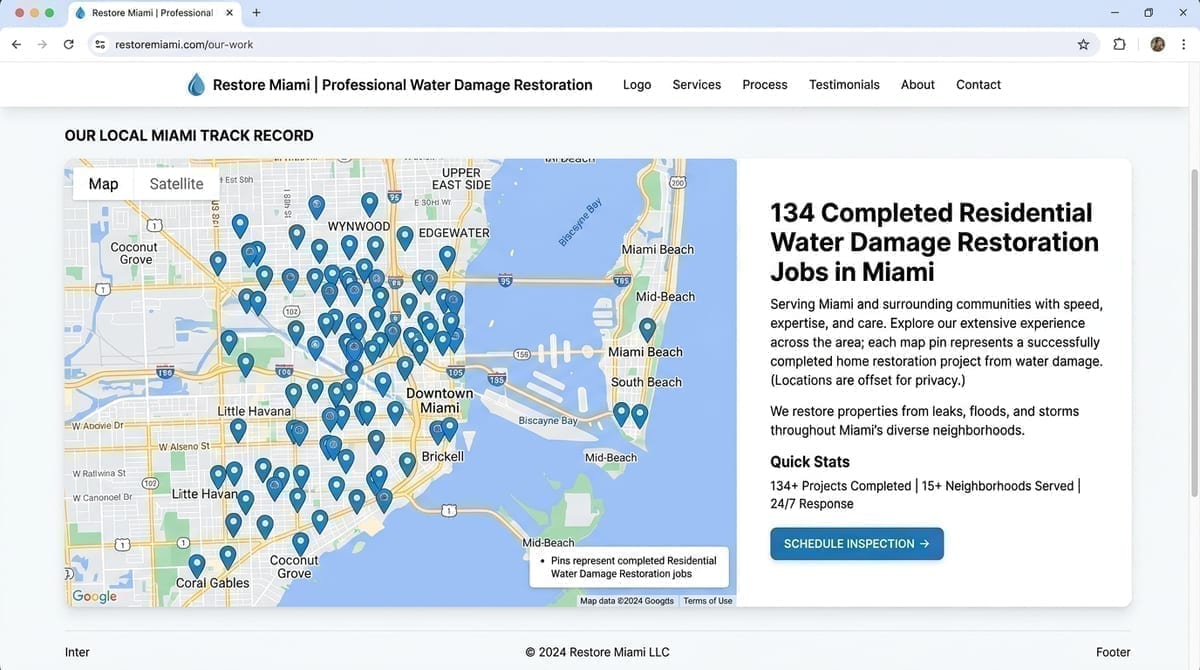
Programmatic job maps

Showing how much work you have done where you say you work is a high-trust signal. On city and service-area pages we can deploy programmatic job maps:

Job Map Example

  • Aggregate counts (completed jobs in that city for that service) match the map and copy—no inflated claims.
  • Privacy-safe pins: offsets and ZIP- or block-level placement—not exact rooftops or PII.
  • Short job blurbs (for example, "Category 3 water extraction in [area]") add unique, entity-rich text per page.
  • Freshness: as jobs complete, data can roll forward so localized pages reflect real activity.

Schema, NAP, and map-pack alignment

We align name, address, phone, hours, and service area with your Google Business Profile and on-page copy. Structured data typically includes LocalBusiness / HomeAndConstructionBusiness markup and Service markup for water, fire, and mold lines. Emergency and 24/7 messaging stays consistent across copy, structured data, CTAs, and your profile.

FAQs stay on the page because people read them, not for a search feature: Google stopped showing FAQ rich results for most sites in May 2026.

Built for Google and AI Answers

Google's guidance on AI features in Search says there are no additional requirements or special optimizations for AI Overviews or AI Mode: the same SEO fundamentals apply. In practice, an AI answer about who to call after a pipe burst can only work from what already exists about your business: your pages, your Business Profile, your reviews. There is no submission form.

What you control on the site:

  • Plain answers on the page. Service areas, hours, what each service includes, and when a problem is an emergency.
  • One consistent set of business facts. The same phone, hours, and service area on every page, in structured data, and on your profile.
  • Distinct pages for distinct jobs. A water mitigation page and a fire restoration page should not say the same thing under different headings.
  • Crawlable, fast HTML. Pages that render without waiting on heavy scripts or plugin chains.

What we will not do is promise that your company will be named in AI Overviews, ChatGPT, or any other assistant. Nobody controls that. Judge the work by calls, form fills, and booked jobs from the pages we build.

Content Agents and Review Gates

A restoration office rarely has a full-time content team, and service-area pages go stale: new towns, new certifications, changed hours. AiPress trains content agents on your own material (services, existing pages, voice, examples, and job notes) so drafts start from your business, not a generic template. Every draft then goes through review:

  • Accuracy: licenses, insurance language, hours, and service area checked against the facts you give us.
  • Uniqueness: a city page has to carry local proof, not just a new town name.
  • Usefulness: if a page does not help someone with that specific search, it does not ship.

We can also add interactive tools where they help a buyer or planner decide—like the proof kit and city-page estimator on this page. The rule is the same either way: pages that do not pass review do not publish.

How We Work With Restoration Companies

  1. Free preview. Send your current site and see a faster version of your homepage in the app. No credit card. Start at Get Started.
  2. Map your services and markets. We audit your site, services, towns, proof assets (credentials, job history, galleries), and the searches you can realistically win.
  3. Build. Service and city pages, trust content, galleries, contact paths wired the way dispatch actually works, and the content agents that maintain them.
  4. Launch, learn, expand. We publish, monitor performance, refresh pages, and add markets as real demand and proof show up.

Already on WordPress or a page builder and worried about losing rankings? See restoration company website migration.

Bottom Line

You are not paid for "traffic." You are paid for trucks rolling.

Website design for restoration companies is worth paying for only when it makes calling you the path of least resistance the second a property owner realizes they have a problem—and keeps your pages accurate as you add towns and services.

Fast. Clear. Credible. One tap to your crew.

That is what we build.

Frequently Asked Questions

What should website design for restoration companies prioritize?

Emergency conversion first: tap-to-call, after-hours clarity, credentials, and proof that you handle water, fire, and mold. Then service and city pages with real local evidence so you show up for the searches that send trucks—not a brochure homepage alone.

Can you guarantee we show up in AI Overviews or ChatGPT for restoration queries?

No, and be wary of anyone who does. We build what those systems can read: fast pages, plain answers, consistent business facts, and real local proof. Judge the work by calls and booked jobs, not by screenshots of an AI answer.

How do your designs increase restoration call volume?

Restoration clients are often in a panic. We reduce friction: click-to-call that stays on screen, mobile pages built for weak signal, and trust signals (IICRC, insured, local) visible before they bounce. We turn urgency into a phone call.

Can I showcase high-resolution project photos without slowing the site?

Yes. Images are resized, compressed, and lazy-loaded so before/after galleries stay sharp without dragging down mobile performance.

Do we need a unique page for every city we serve?

Only where you have real coverage and proof. Thin city clones hurt more than they help. Primary markets get deeper pages and stronger internal links; secondary towns get fewer, better pages—or stay on a service hub until you have evidence to publish.

Do I need to manage WordPress plugins or updates?

No. You update copy and media through a simple workflow; the stack stays fast and secure without a plugin maintenance circus.

Convert More Emergency Calls

See a free preview of your homepage as an emergency-ready restoration site: tap-to-call, proof, and fast mobile pages.

Get Your Free Preview