
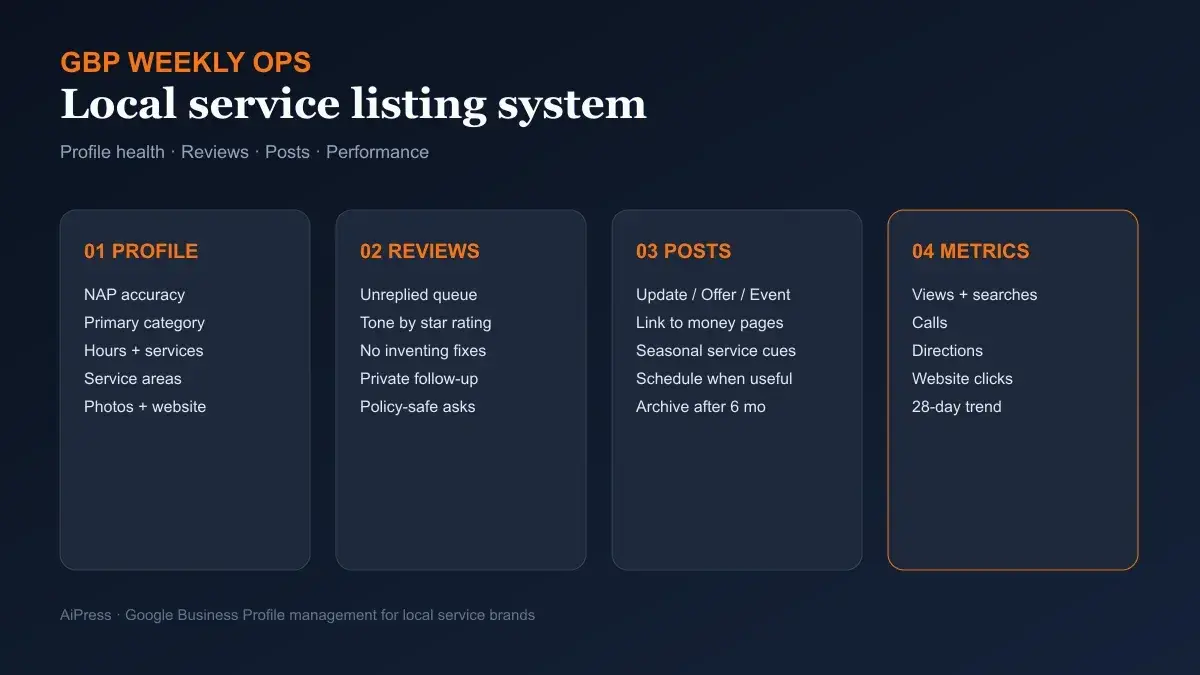
Google Business Profile Management for Local Service Businesses
 Treat the listing like a conversion surface: keep the profile accurate, clear the review queue, ship useful posts, and read the metrics that predict calls.
If you run plumbing, restoration, leak detection, HVAC, cleaning, or another local service brand, Google Business Profile (still searched as Google My Business by a lot of owners) is often where the job starts.
Someone searches “emergency plumber near me,” “water damage restoration,” or “leak detection [city].” They see the map pack or a place panel. They check hours, categories, photos, and the latest reviews. Then they tap Call, ask for directions, or click the website.
That sequence is why Google Business Profile management is not a one-time SEO task. It is an operating system for discovery and trust.
Google’s own local ranking guidance is blunt about the levers: keep information complete and accurate, respond to reviews, add photos, and understand that local results lean on relevance, distance, and prominence. There is no paid shortcut for better organic local ranking.
What most local service teams still miss is cadence. The profile that wins next quarter is usually the one that stayed current while competitors let hours drift, left reviews hanging, and posted nothing for months.
Why GBP is the conversion surface for local services
Website SEO still matters. For service businesses, though, the Business Profile often decides whether the website ever gets a fair shot.
A homeowner with a sewage backup does not want a 12-page education journey first. They want proof you exist, serve their area, answer the phone, and have recent customers who did not regret calling you.
That is the job of the listing:
- Relevance — categories, services, and description that match what people actually search
- Distance / service coverage — a correct storefront pin or a truthful service-area setup
- Prominence — reviews, mentions, and the broader reputation signals Google associates with the business
Google states those three ideas directly in its tips to improve local ranking. Your management system should map to them every week, not once during onboarding.
For multi-location or multi-brand operators, the listing also becomes a shared front desk. If one franchise leaves the phone number wrong after a carrier change, the campaign budget still spends—and the calls die.
AiPress builds fast AI websites and programmatic SEO systems for service brands for the same reason: the site and the listing have to reinforce each other. A sharp website with a neglected Google profile is a leaky funnel.
 Google’s public guidance ties local visibility to verification, complete information, reviews, photos, and the relevance–distance–prominence model.
Profile foundations that decide whether you get found
Start with the fields that make a local service searcher trust the panel enough to tap.
Name, phone, website, and hours
Use the real business name customers see on trucks, invoices, and uniforms. Google’s edit-profile guidance says to enter the name exactly as it appears on real-world signage and branding—and that name changes after verification can force re-verification.
Keep the primary phone as the number a human or call-routing system actually answers. Website URLs should be full https:// links to the live site, not a temporary landing page from last year’s campaign.
Hours matter more for emergency categories than owners admit. If you offer after-hours dispatch, say so with main hours plus special hours. If you are appointment-only during weekdays, do not leave “Open 24 hours” because it sounded aggressive in a sales meeting.
Categories and services
Pick the narrowest accurate primary category for what you mainly do. Google allows additional categories (up to nine more after the primary) and warns against treating categories as keyword stuffing or borrowing a nearby business’s category just because it ranks.
For a restoration company, “Water damage restoration service” is usually more honest than a vague contractor label. For a leak specialist, match the work you actually sell first. Wrong primary category puts you in the wrong competitive set—something home-service operators argue about constantly in public marketing chatter, for good reason.
Then fill services with the work you want to book. Vague “plumbing services” is weaker than naming drain cleaning, water heater repair, or camera inspection when those are real offers.
Service-area vs storefront configuration
This is where local service businesses get suspended or quietly underperform.
Google defines a service-area business as one that visits or delivers to customers and does not serve customers at the business address—plumbers and cleaning services are the examples Google uses. Those businesses get one profile for the whole area they serve. If customers do not come to your address, Google’s help pages say to remove or hide that address from the public profile.
You can set up to 20 service areas by city, postal code, or other place types. You cannot set a radius. Google also advises that the overall area should not stretch beyond about two hours of driving from where the business is based, and that edits may take up to 48 hours to appear after approval.
 Service-area rules are compliance and ranking hygiene: hide the address when customers do not visit you, stay specific, and stay within a realistic coverage footprint.
If you are hybrid (showroom plus field crews), show the address and define the service area. If you are a pure field operation, do not publish a home office as a storefront just to look bigger on the map.
Description, attributes, and photos
The business description has a 750-character limit. Google says to focus on what you offer and what makes you distinct—and to avoid URLs, HTML, and promo-first copy.
Attributes and photos are how a stressed customer decides you look like a real crew. Upload exterior branding, vans, equipment, and job-context photos that match the services you sell. Stock office handshakes do not help a water-damage searcher.
Your website should reinforce the same business facts Google already sees on the listing. Google Search Central documents LocalBusiness markup so eligible pages can help Search understand hours and other business details. Keep NAP and hours consistent between the site and the listing; conflicting sources make both surfaces weaker.
Review operations that protect reputation and conversion
Reviews are not a vanity score for local services. They are pre-call due diligence.
Google encourages owners to remind customers to leave reviews, reply to them, and treat a mix of positive and negative feedback as normal. It also draws a hard line: offering free or discounted work in exchange for reviews, review changes, or removal of negative reviews is prohibited as fake and misleading content. See Google’s tips to get more reviews.
Build a request habit that survives the job day
The best request moment is after a completed job with a clear outcome—not a blast to every CRM contact on Friday. Train techs and office staff to send the official review link or QR when the customer is satisfied and the invoice is settled.
Do not coach the star rating. Do not trade discounts for five stars. That is how you buy a short-term bump and a long-term policy problem.
Reply like an operator, not a chatbot
Google’s reply guidance is practical: be professional, keep it short, avoid identical thank-you spam, stay conversational instead of promotional, and respond to negatives with privacy, empathy, and a path offline when the issue is complex.
A useful house rule for local service brands:
| Rating | Reply posture |
|---|---|
| 5 stars | Thank them, name the service, invite them back or to refer neighbors |
| 4 stars | Thank them, acknowledge the specific praise or friction |
| 1–3 stars | Empathize, own what you can verify, invite a private follow-up, do not argue in public |
Never invent refunds, guarantees, or “we already fixed it” claims in a reply. Never paste the customer’s address or phone into the public thread.
Unreplied reviews are a weekly liability. Prospects scroll recent responses. A silent profile looks like a company that disappears after the check clears.
 Google’s review guidance is policy plus craft: ask honestly, reply specifically, and move messy disputes offline.
Posts, photos, and Q&A as a weekly cadence
A complete profile that never publishes still looks abandoned next to an active competitor.
Google lets you create Updates, Offers, and Events on the Business Profile. Updates can include media and an action button that points to a real next step—booking, learning more, or ordering. Offers need titles and date windows. Events need start and end timing. Posts older than six months are archived unless a date range is set. Putting a phone number in the post body can get the post rejected; use profile phone fields and approved CTA patterns instead.
For local services, useful post ideas look like operations, not slogans:
- Storm-season water intrusion checklist with a link to the restoration service page
- “What to do before our tech arrives” for leak detection appointments
- Hiring or capacity notes when schedule windows change
- Seasonal maintenance offers with clear dates and terms
Schedule posts when the team cannot publish live, and prefer links to durable money pages on your site—not orphan PDFs. The listing should feed the website you already invested in, including any local SEO content calendar work that produces proof-backed pages worth linking.
Q&A deserves the same discipline. Answer factual questions about service areas, emergency response, financing, or insurance documentation. Delete or flag abuse when needed. Do not leave outdated answers living next to a corrected service menu.
Metrics that matter: impressions to calls and directions
If you only watch “views,” you will misread the listing.
For verified profiles, Google’s performance and insights surface searches, views, directions, calls, website clicks, messages, and other interaction types that apply to your category. Not every metric appears for every business.
For a field-service brand, the weekly scoreboard should emphasize:
- Calls — did the call button get used?
- Website clicks — is the listing sending qualified traffic to service pages?
- Directions — more relevant for storefront or hybrid models than pure SABs
- Search terms — what language customers actually use (updated on Google’s monthly cadence for that report)
- Views — context for whether demand or visibility changed
 Read calls, website clicks, directions, and search queries together. Views alone rarely explain whether the listing is producing jobs.
Compare a rolling 28-day window to the prior period. A spike in views with flat calls often means category mismatch, weak photos, scary unreplied reviews, or a phone/routing failure—not “SEO is working.”
Pair GBP metrics with site analytics and call tracking. When the listing and the website disagree on hours or service areas, both conversion rates suffer.
Common failure modes for service-area businesses
These are the mistakes that burn local service operators even after they “claimed” the listing years ago:
- Storefront cosplay — publishing a residential or virtual address as a public storefront when customers never visit
- Radius fantasy — claiming half the state instead of specific cities or ZIPs you actually run
- Category greed — stacking unrelated categories as keywords
- Hours fiction — emergency marketing copy that does not match the hours field
- Review ghosting — weeks of unanswered 1-star and 5-star reviews
- Incentive schemes — gift cards for five-star reviews (policy risk)
- Orphan posts — promotional posts with dead links or phone numbers stuffed in the body
- Website mismatch — different NAP, different cities served, different “open now” story on the site vs the profile. That contradiction also weakens AI Overview supporting-link visibility, because Google has to reconcile two versions of the same business.
- No owner — the listing lives under a former employee’s personal Google account
- Set-and-forget — treating Google My Business as a 2019 checkbox while competitors run weekly ops
Fix ownership and access first. Then fix accuracy. Then install the weekly loop.
How AiPress manages Google Business Profile automatically
Manual discipline works until the owner is on a roof, the CSR is buried in dispatch, and the marketing contractor only logs in monthly.
AiPress treats Google Business Profile management as part of the same growth system as the website and content engine. Using Google’s Business Profile APIs through our Google Business Profile management stack, we can run the operating rhythm described above without asking your team to live inside the Maps UI.
Concretely, AiPress can:
- Audit listing health — confirm phone, website, hours, categories, and other gaps on allowlisted locations
- Clear the review queue — draft on-brand owner replies, dry-run them, and publish only after approval
- Publish local posts — ship Updates, Offers, or Events tied to real service pages, with confirmation before anything goes live
- Pull performance snapshots — track views, calls, directions, website clicks, and related metrics on a recurring window
- Run a weekly review — connectivity check, unreplied reviews, listing gaps, and a short “done vs open” report
Write actions default to dry-run first. That matters. Local listings are easy to damage with a bad bulk edit; the workflow is built to preview, confirm, then apply.
This is the same systems mindset behind AiPress AI website builds and portfolio-scale programmatic SEO: define the rules, keep humans in the approval loop where trust is on the line, and stop relying on memory to protect the front door of the business.
We do not claim a paid or guaranteed local ranking. Google is explicit that you cannot buy organic local rank. What you can buy is consistent management—accurate data, faster review response, useful posts, and metric visibility—so the profile stays competitive while your crews stay on jobs.
What to do next
If your listing has been “claimed” but not operated, run this 7-day reset:
- Confirm ownership and manager access on the correct Google account
- Fix primary category, services, hours, phone, and website
- Correct service-area vs storefront settings; remove a public address if customers never visit
- Reply to every unreplied review with specific, policy-safe language
- Publish one useful Update post that links to a real service page
- Screenshot this week’s calls, website clicks, directions, and search terms as your baseline
- Put a recurring weekly review on the calendar—or hand the loop to a system that will actually run it
If you'd rather hand this off, see our Google Business Profile management service.
If you want AiPress to manage Google Business Profile alongside the site and content system, plan your AI website or call (954) 324-1094. Bring your current Maps listing and the service areas you actually cover. We will tell you what is broken, what can be automated, and what still needs a human decision.
Google Business Profile policies, metrics availability, and UI labels change. Confirm details on the official Google Business Profile Help pages before you make structural edits, and treat this article as operational guidance—not legal advice.