
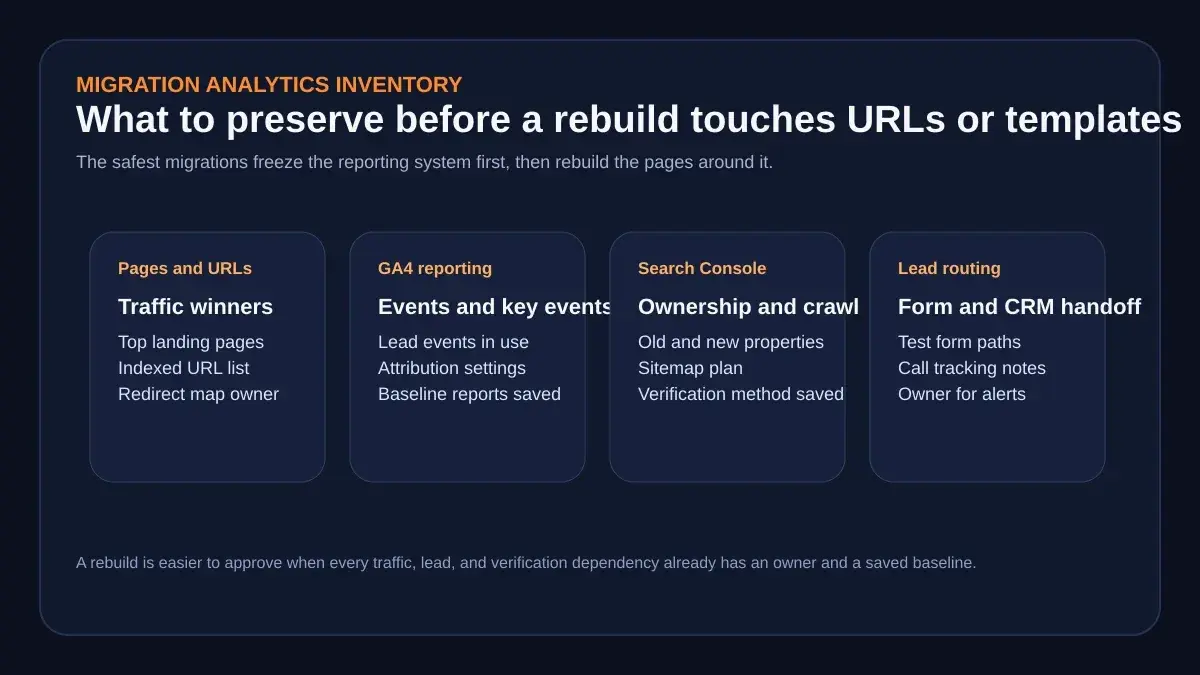
 The strongest migration plans freeze the reporting system first, then rebuild the pages around it.
A website migration analytics plan is not the glamorous part of a rebuild. It is the part that tells you whether the rebuild actually worked.
That distinction matters because many teams approve a migration once they see the visual preview, the speed gains, or the redirect spreadsheet. Those things matter. But the executive question after launch is usually simpler: did we preserve the pages, traffic signals, and lead paths that the business depends on?
If you cannot answer that quickly, the rebuild may be technically cleaner yet still feel riskier than it should. That is why an analytics plan belongs in the approval process, not in the cleanup pile for launch week.
AiPress already frames AI website migration as more than a design refresh. Its public migration page says the right move is often preserving the equity of the current site while fixing the platform drag that slows performance, publishing, or search growth. Google makes a similar point from the opposite direction in its site-move guidance: do not change everything at once if you can avoid it, and be deliberate about how the move is verified, redirected, and monitored.
Put those two ideas together and the implication is clear. A rebuild is not just a front-end project. It is a measurement-continuity project.
Why analytics continuity is a migration decision, not a launch-afterthought
The weak version of migration planning says, "We will fix tracking after the new site is live."
The stronger version asks a harder question much earlier: what evidence do we need in order to trust the post-launch numbers at all?
That early framing changes the quality of the project. Instead of treating analytics as a tag that gets reattached later, the team starts by documenting which pages matter, which actions count as qualified engagement, which lead events actually drive revenue, and which Google properties need to keep working across the move.
This is also where a lot of otherwise careful projects get tripped up. Google recommends changing one major thing at a time during a move rather than changing the domain, CMS, and layout simultaneously. The practical reason is obvious: if traffic, leads, or indexation wobble after launch, you want fewer variables to untangle. Your analytics plan is what makes that untangling possible.
AiPress's own website migration SEO checklist reinforces the same operating principle. Before launch, it tells teams to export URLs from Search Console, export baseline traffic data from Analytics, verify analytics tracking in testing, and monitor Search Console errors plus Analytics signals after the move. That is not optional paperwork. It is the proof system for the migration.
Said differently: a rebuild earns trust when the team can show the old baseline, the new implementation, and the comparison logic that links them.
What to inventory before anyone changes URLs or templates
Before anyone touches templates, metadata rules, form handlers, or redirect logic, freeze a short inventory of the current measurement stack.
The most useful version is not a giant audit deck. It is a working sheet with owners, exports, and the few systems that matter most:
| Surface | What to freeze before the move | Why it matters |
|---|---|---|
| High-value URLs | Top landing pages, organic winners, money pages, and the redirect owner | You need a stable list for post-launch comparisons |
| GA4 | Live event names, key events, baseline reports, attribution settings | Otherwise the before-versus-after story changes midstream |
| Search Console | Old and new properties, verification method, sitemap plan | Visibility monitoring breaks if ownership or crawl signals break |
| Lead routing | Contact forms, call paths, CRM notifications, inbox or alert owners | Page speed wins are meaningless if the lead never reaches the team |
This is where AiPress's public migration material is more helpful than generic redesign copy. On the migration page, its checklist specifically says to inventory every indexed URL from Search Console and the sitemap before changing platforms, preserve titles and descriptions along with canonicals and structured data where possible, and submit an updated sitemap plus URL Inspection checks on top pages after launch. Those are concrete operating tasks, not just slogans about SEO safety.
For most teams, the inventory itself should include at least:
- the top pages that currently attract organic traffic
- the forms or calls that matter most to the sales process
- the event names used to mark those actions in GA4
- the Search Console properties and verification method currently in use
- the person who owns the redirect map, the event validation pass, and the post-launch daily review
If you want a practical rule, use this one:
Do not approve the rebuild until someone can point to the baseline for every page family and every lead action you care about.
How to preserve GA4 events, key events, and reporting logic
 The migration should change architecture and speed, not the business meaning of your lead signals.
Google's current GA4 language is useful here because it separates "interesting activity" from "business-critical activity."
In Google's documentation, a key event is an event that measures an action particularly important to the success of your business. Google also says that any collected event can become a key event once you identify it as important and mark it that way. That sounds simple, but it has an important migration implication: your team should know exactly which actions deserve to survive intact before the new site goes live.
For a lead-generation site, that usually means actions like:
- a contact form submission
- a quote request
- a booked consultation
- a phone-call event if you track one cleanly
- a demo or free-preview request
Google also notes that reports like Landing pages and User acquisition include a Key events column. That is one reason to preserve naming and intent instead of casually replacing everything at launch. If the old site used one event structure and the new site uses a looser or renamed structure, your landing-page comparisons get harder right when leadership wants clarity.
This is the cleanest sequence:
- Export or document the live events that matter now.
- Mark or confirm the important ones as key events.
- Recreate those same business actions on the new site.
- Trigger them in testing and again after launch.
- Compare the same report logic before and after, rather than inventing a new reporting story during the move.
Google's newer conversions guidance helps here too. It documents the flow as Event -> Key Event -> Conversion and explains that conversions can provide more consistent measurement between Analytics and Google Ads when those platforms are linked. If your paid reporting depends on that connection, preserve the underlying event meaning first. Only then decide whether the Google Ads conversion setup also needs to be recreated or reviewed.
The mistake to avoid is not merely "missing a tag." The deeper mistake is losing the business meaning of the event. If the old site tracked generate_lead and the new site replaces it with a vague click event or a half-tested thank-you-page trigger, the analytics may still look active while the decision signal is worse.
That is why a rebuild should preserve reporting logic, not just scripts.
What Search Console should prove before and after launch
 Search Console is most useful when ownership, redirect logic, and sitemap intent are already in place before cutover.
Search Console is where a migration team proves that Google can still understand the move you intended to make.
According to Google's site-move documentation, teams should verify both the old and new sites and also verify important variants such as www and non-www, along with http and https where relevant. Google also warns teams to make sure their verification method still works after the move. If you rely on an HTML file, a meta-tag include, or Analytics-based verification, the new version of the site still needs to support that method.
That single detail gets missed more often than it should. Teams remember redirects, but forget the property proof.
Once ownership is secure, the next proof layer is redirect + sitemap discipline:
- turn on clean server-side permanent redirects
- avoid redirect chains where possible
- submit the new sitemap in Search Console
- watch how the old and new sitemap counts shift during the move
Google explicitly says Search Console can show the old sitemap's indexed counts dropping while the new sitemap's indexed counts rise. That is exactly the kind of directional signal a migration review needs. It will not tell you everything, but it tells you whether Google is learning the new URL set the way you expected.
One more caveat matters here because it is easy to overuse the wrong tool. Google's Change of Address documentation is not for every rebuild. It is for moves from one domain or subdomain to another, after the move and redirects are already in place. Google also says not to use it for an http to https move, for path changes inside the same site, or for a hosting change that does not create visible URL changes.
That distinction is valuable in boardroom language too. It tells the team that not every migration needs every migration signal. Some need redirects and sitemap work. Some also need Change of Address. The plan should reflect the actual move, not a generic checklist copied from another project.
How AiPress turns migration into a cleaner measurement system
The commercial value in AiPress's public positioning is not simply that it promises a faster site. It is that the migration can become the moment when the tracking stack gets cleaner, more deliberate, and easier to trust.
On the AI Websites page, AiPress describes a process that analyzes the current site, extracts content and media, rebuilds pages using modern architecture, maintains URLs where possible, and prepares assets like sitemaps before launch. It also describes a review stage in which the full site is checked in staging, compared side by side with the current version, and verified before anything goes live.
That is exactly the right place to ask analytics questions, because staging review is where teams can still fix them cheaply.
The Get Started page also shows a low-friction entry point for that conversation: email, website URL, optional name, and no credit card required. For teams that know they need a rebuild but have not yet built a measurement plan, a preview is useful only if it leads to better migration questions:
- Which landing pages define success today?
- Which GA4 events are we preserving exactly?
- Which actions are key events versus nice-to-have interactions?
- Which Search Console properties and sitemap files need to stay visible throughout the move?
- Who owns the first seven days of post-launch reporting?
That last question is where migrations often become more trustworthy. The technical implementation can be delegated. The reporting ownership cannot.
A launch-week validation plan for forms, calls, and CRM handoffs
 The live test is not complete until the event, the notification, and the business follow-up path all agree.
Launch week should not rely on "the tag fired in preview mode" as the final proof.
AiPress's own migration checklist says to verify analytics tracking before launch and to monitor Search Console plus Analytics signals immediately after. That gets you most of the way there. The remaining discipline is operational: run the actions that matter on the live site and confirm the full handoff.
A practical launch-week loop looks like this:
Before launch
- save baseline landing-page, traffic, and key-event views
- confirm who owns the event-validation pass
- confirm who owns form and CRM follow-up checks
Launch day
- test the highest-value form paths on the live site
- confirm the expected GA4 event arrives
- confirm the action is still treated as the right key event
- confirm the email, CRM, or notification path receives the submission
First 7 days
- check Search Console crawl and sitemap signals daily
- compare landing-page and key-event behavior to the pre-launch baseline
- watch for obvious breaks in redirect, tracking, or lead-routing logic
- annotate the analytics timeline so later reviews know when the move happened
This is also where discipline beats panic. Google notes that ranking and indexation can fluctuate during a move, and that some changes take time to settle. The point of launch-week reporting is not to overreact to every wobble. It is to separate expected transition noise from real implementation problems.
If the key event path is intact, the redirects are correct, Search Console ownership still works, and the sitemap shift looks sane, the team can review the move with much more confidence.
Next steps
If your team is considering a rebuild, do not treat analytics as a postscript to the design review. Treat it as part of the website rebuild approval memo: this page owns the measurement inventory, and that memo owns the owner-facing decision.
Start with the baseline:
- export the current URL and traffic winners
- document the GA4 events and key events that matter
- confirm Search Console ownership and the migration signal you actually need
- assign owners for launch-week validation, not just launch-day deployment
Then use the rebuild to simplify the reporting system rather than merely transplant it. That is the real upside of a modern migration. You are not only leaving a slower stack behind. You are giving the business a cleaner way to see what still works, what improved, and what needs attention first.
If you want a concrete starting point, request the free homepage preview and use it as a working session for the measurement questions above, not just a design reaction.
Google product behavior, analytics configurations, and AiPress offers can change. Confirm the exact steps in your own properties before launch.