
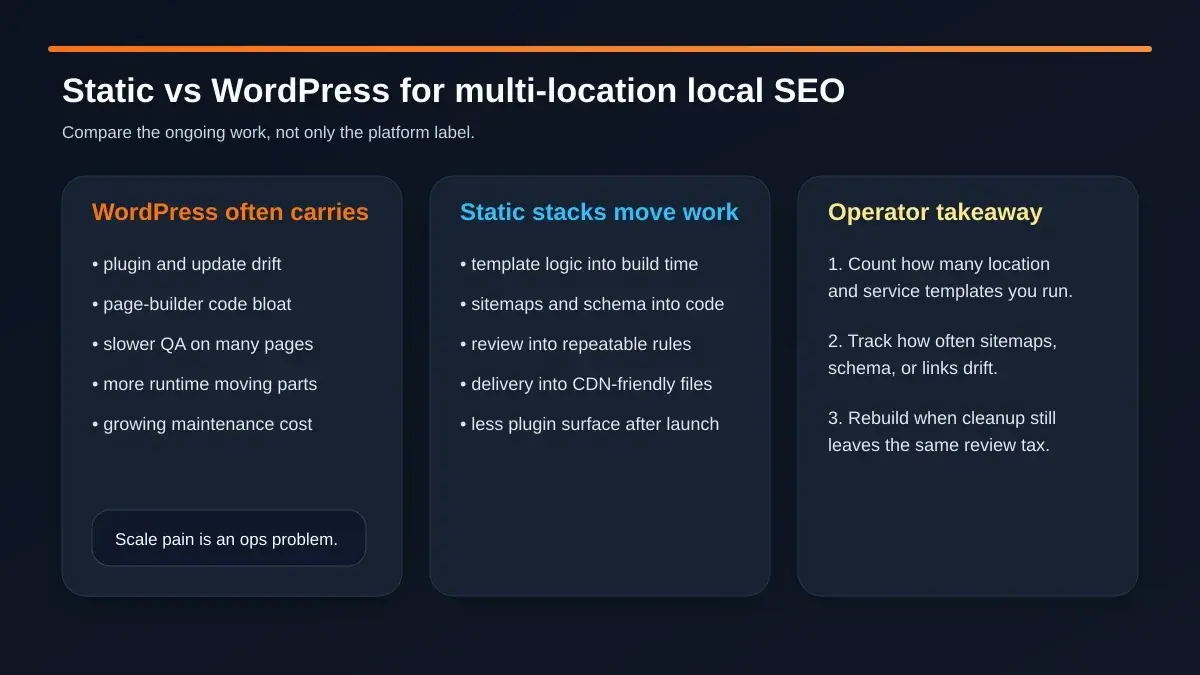
 The real platform question is not just speed. It is how much review, drift, and maintenance your local SEO system creates once the page count grows.
The WordPress vs static local SEO debate usually gets flattened into one claim: "static is faster."
The real platform question is not just speed. It is how much review, drift, and maintenance your local SEO system creates once the page count grows.
The WordPress vs static local SEO debate usually gets flattened into one claim: "static is faster."
That is too shallow to help an operator who is responsible for dozens of city pages, service variants, redirects, sitemaps, QA checks, and launch timing.
For a small site with a handful of core pages, WordPress can still be perfectly workable. For a multi-location site with hundreds or thousands of URLs, the decision changes because the real cost moves from design freedom to operating overhead. The important question becomes this:
Can your current system keep page templates, location details, sitemaps, and launch checks aligned without creating a permanent review tax?
That is why this article is less about platform tribalism and more about operations. Google says large sitemaps have to be split once they exceed 50,000 URLs or 50MB uncompressed, and it recommends using fully qualified canonical URLs plus root-level sitemap placement so discovery stays clean. Those are not abstract SEO details. They are workflow details. The moment your site expands across many cities, services, or property types, the platform decision becomes a governance decision.
Why multi-location local SEO makes platform choice harder
The problem is not "more pages" by itself. The problem is more page families.
A local brand that serves one city with six services might have a manageable structure. A regional brand with residential and commercial variants, neighborhood content, blog support, problem pages, and seasonal pages has a very different machine to run.
That is where architecture starts to matter.
In the Hernandez Plumbing project behind our Miami plumbing case study, a service-and-city architecture for Miami-Dade & Broward peaked at about 1,200 pages (March 2026 crawl); after quality pruning, the live sitemap lists 328 URLs (as of Oct 8, 2026). The takeaway is not that every business needs that many URLs. The takeaway is that once you support that kind of coverage, you need rules for:
- URL hierarchy
- city prioritization
- internal link flow
- page-type markup
- sitemap segmentation
- launch review
If those rules live mostly in plugin settings, builder widgets, and editor habits, the system gets harder to trust as the site grows.
If those rules live in code, templates, and repeatable review checks, scale becomes easier to reason about.
That is the core platform difference.
Where WordPress still works well
WordPress still makes sense more often than rebuild advocates admit.
If your business has a modest footprint, a disciplined plugin set, and a content team that is not constantly stretching the template system, WordPress may remain the right answer. Google even notes that many CMSes already generate sitemaps automatically, which is a real convenience when your URL inventory is still manageable.
WordPress is often a solid fit when:
- the site has a limited number of service and location templates
- your team needs fast editing by non-developers
- you are not carrying a page-builder-heavy frontend
- plugin updates are infrequent and well understood
- QA can still happen page by page without becoming a bottleneck
In other words, WordPress works well when the website is still behaving like a website, not like a content system with many moving template families.
That distinction matters. The mistake is not using WordPress. The mistake is expecting a lightly governed WordPress stack to stay calm after the URL count, template count, and reviewer count all rise together.
Where WordPress becomes an operations tax
The pain usually shows up long before the site is "down."
AiPress's Why WordPress Breaks at Scale page frames the problem around request-time assembly: PHP execution, database queries, plugin code, and theme rendering happen on every page load. Its page-builder breakdown adds another layer: heavier HTML, more JavaScript, larger CSS payloads, and more chances for visual editing systems to complicate the output.
That matters for multi-location SEO because the real burden is cumulative:
-
Template creep
One exception turns into ten. One city variant becomes a new branch. One builder widget becomes another front-end dependency the team now has to remember during QA. -
Sitemap drift
Once the URL set is large, the sitemap is no longer a housekeeping file. It becomes part of launch control. If it is outdated, split poorly, or missing canonical URLs, discovery gets sloppy fast. -
Review fatigue
A local site with many page families cannot be checked one page at a time forever. Review has to move from "open every page" to "sample intelligently and inspect outliers." If the platform makes that hard, QA gets skipped. -
Runtime surprises
Caching changes, plugin updates, script conflicts, and page-builder quirks can all reintroduce work after a launch that already felt finished.
 Large local sites rarely break in one dramatic moment. They usually collect recurring friction in sitemaps, templates, QA, and post-launch behavior.
None of that means a static architecture automatically wins. It means the cleanup path has to be judged honestly. If your team keeps solving the same review problem in new places, the issue may no longer be content quality alone. It may be platform fit.
What static architecture changes for sitemaps, templates, and QA
The most useful way to think about a static stack is this: it shifts more of the website's rules upstream.
Instead of relying on a runtime mix of CMS settings, plugins, and page-builder output, a strong static system pushes more of the important behavior into templates, generation logic, and review rules before publish.
For multi-location local SEO, that changes daily operations in a few concrete ways.
1. Sitemaps become part of the build system
Google says large sites should split sitemaps once they exceed 50,000 URLs or 50MB, and it recommends fully qualified canonical URLs. A static workflow makes that easier to treat as a repeatable output, not a manual afterthought.
That does not guarantee better rankings. It does reduce the chances that a large launch quietly ships with incomplete discovery hygiene.
2. Local Business markup becomes easier to standardize
Google's Local Business documentation says you should deploy a few pages first, inspect them, validate the markup, and then ask Google to recrawl. That sequence becomes more manageable when location-level markup comes from known templates instead of page-by-page improvisation.
The win is not "more schema." The win is cleaner consistency:
- what every city page must include
- what changes by location
- what must be tested before rollout
3. QA moves from page-by-page review to pattern review
AiPress describes pattern-based sampling on its programmatic SEO systems page because high-scale sites cannot review every page one by one forever. That is the right mental model for local SEO as well.
The question is whether your system supports checks like:
- one sample page per service template
- one sample page per city tier
- one outlier review set for pages with unusual content or links
- one post-launch monitoring loop for indexing and traffic anomalies
When that is built into the workflow, scale becomes more governable.
4. Delivery is simpler after publish
AiPress's case-study stack uses static export specifically so pages are crawlable without JavaScript execution and avoid request-time rendering drag. That does not solve thin content or bad IA. It does reduce the number of runtime variables that can surprise you after launch.
5. Search Console becomes part of launch, not cleanup
Google describes Search Console as the place to monitor, maintain, and troubleshoot search presence. For large local sites, that means launch is not over when the URLs are live. Search Console belongs in the workflow for:
- sitemap submissions
- indexing checks
- error and alert review
- validation of important page groups after rollout
 A multi-location rebuild is safer when URL mapping, template rules, sitemap handling, QA sampling, and monitoring are all defined before launch day.
The important caveat is worth repeating: a static stack does not rescue weak strategy. Thin city pages, messy link logic, and vague page intent will still underperform. Static architecture just makes it easier to enforce the rules that prevent those problems from multiplying.
How to decide whether to clean up, simplify, or rebuild
The cleanest decision framework is not based on hype. It is based on recurring review cost.
Ask the hard question after you have already tried the obvious cleanup:
- reduced plugin count
- trimmed page-builder usage
- clarified page templates
- improved caching and image handling
- simplified launch rules
If those steps still leave the same recurring friction around sitemaps, page review, city-template exceptions, and post-launch surprises, then you may not have a cleanup problem anymore. You may have an architecture problem.
Here is a practical way to classify the decision:
Keep improving the current stack
Stay on WordPress when the problems are specific, bounded, and getting better with cleanup. This is usually the right move when the site is still relatively compact and the maintenance burden is real but not compounding.
Run a pilot
If the team is split, test one service cluster or one city family with stricter upstream rules. This is often the best way to discover whether the real issue is governance or the platform itself.
Rebuild the system
Rebuild when cleanup still leaves the same review tax in place. That is the signal that the system is asking humans to repeatedly compensate for architecture that no longer fits the scope.
 The deciding factor is not whether WordPress can be optimized. It is whether cleanup actually removes the same recurring scale problems your team keeps paying for.
That framing also protects you from a common mistake: rebuilding too early. Some sites do not need a new platform. They need fewer plugins, tighter templates, clearer page ownership, and better launch discipline.
How AiPress approaches multi-location scale without publishing chaos
The AiPress model is useful because it treats scaling as an architecture problem first.
On the programmatic SEO page, AiPress emphasizes review by page pattern, outlier checks, and continuous refresh instead of pretending every large set can be inspected line by line forever. In the AI Websites page, the review step is explicit: preview every page, compare it with the old site, request changes, and verify accuracy before launch.
That matters for local SEO because it pulls together the three responsibilities that often get split apart:
- build the page families correctly
- review the right sample set before launch
- monitor the important signals after rollout
The Miami case study strengthens that story because the link flow is intentionally commercial: blog posts support city pages, city pages support service hubs, and tier-one cities receive the deepest coverage and strongest reinforcement.
That is a better model than publishing support content in isolation and hoping authority somehow lands on the pages that actually convert.
If your team is in rebuild mode, the better question is not "Should we leave WordPress?" It is:
What system will let us manage many local pages without repeatedly paying for the same sitemap, template, and QA mistakes?
That question leads to much better architecture decisions.
FAQ
Does a static site automatically rank better than WordPress for local SEO?
No. Better architecture does not guarantee better rankings. Search performance still depends on page usefulness, location specificity, internal links, crawl hygiene, and review discipline. A static stack mostly changes how reliably you can enforce those rules at scale.
Is WordPress always the wrong choice for service-area SEO?
No. WordPress can be the right choice for smaller or simpler local sites, especially when the editorial team needs fast content editing and the template count is still manageable. The danger shows up when the site scope grows faster than the system's review discipline.
What is the first sign that a platform mismatch is becoming expensive?
Usually it is not traffic loss in isolation. It is repeated operational friction: sitemap drift, template exceptions, page-review backlog, plugin surprises, or launches that need too much manual cleanup after go-live.
What should be tested before a large local SEO rebuild goes live?
At minimum, test URL mapping, canonical behavior, sitemap structure, Local Business and service-page markup, internal-link logic, sample pages from each template family, and Search Console visibility after launch.
Next steps
If you are deciding between cleanup and rebuild, map the review tax before you map the new design.
Count how many page families you have. Count how many exceptions your team already carries. Count how many launch checks still live in memory instead of in the system.
If those numbers are small, WordPress may still be the right tool.
If those numbers keep rising, the platform discussion is really an operations discussion. When the page families themselves are the bottleneck, see our multi-location SEO service. That is where a system built around reviewable templates, controlled outputs, and cleaner launch governance starts to earn its keep. If you want a second set of eyes on that decision, plan a rebuild with AiPress.
Search behavior, indexing patterns, and markup eligibility change over time, so confirm implementation details against current Google documentation before a major rebuild or migration.