
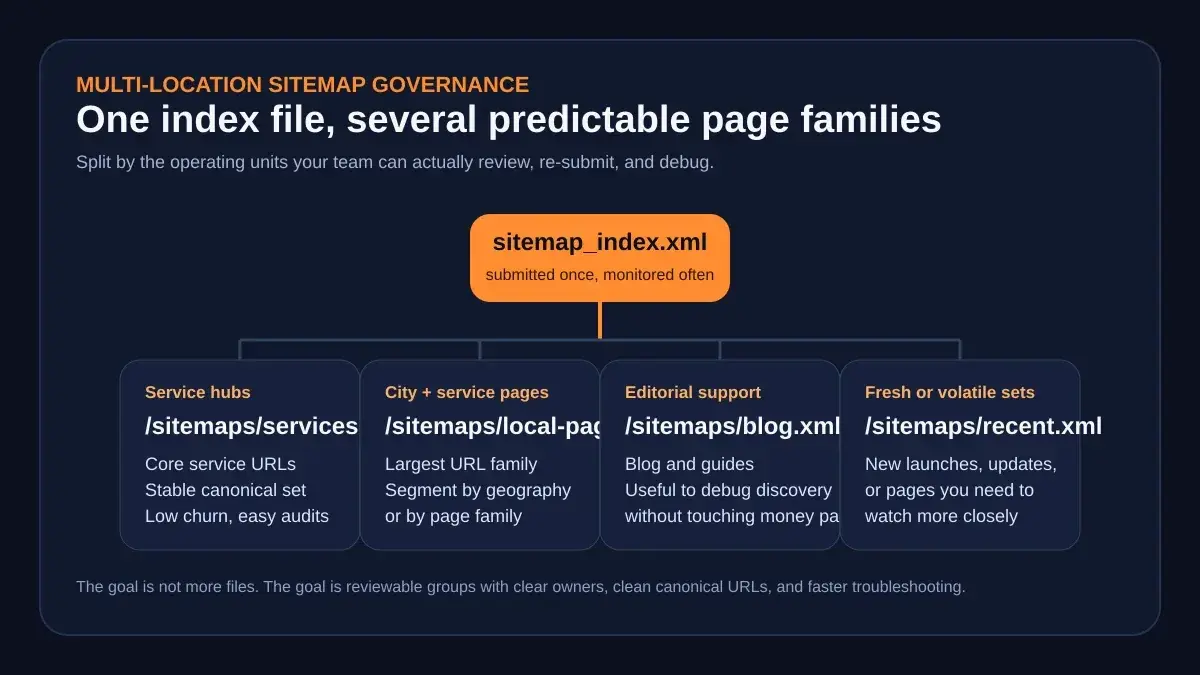
 A strong sitemap system mirrors the way your team actually launches, reviews, and troubleshoots page families. It is an operating model, not just an XML export.
A multi location sitemap strategy stops being a minor technical chore the moment your site stops behaving like a small brochure and starts behaving like a page system.
That shift usually happens earlier than teams expect. One brand adds city pages. Then it adds service + city combinations. Then it adds blog support, seasonal pages, neighborhood pages, comparison pages, or landing pages for a second market. Suddenly the sitemap is no longer a quiet utility file living in the background. It becomes part of launch control for a true multi location sitemap strategy.
Google's own Build and submit a sitemap guidance is clear on the mechanical rules: one sitemap tops out at 50,000 URLs or 50MB uncompressed, larger sets should be split, and the file should contain fully qualified canonical URLs. But the hard part for operators is not memorizing those rules. The hard part is building a workflow around them so the right URLs make it into the right files, the files stay reachable, and the team notices trouble before a whole page family falls behind.
That is why this article treats sitemaps as an operations question. If you manage hundreds of service-area URLs, you need a strategy for partitioning, submission, monitoring, and exception handling. Otherwise the sitemap quietly turns into one more place where launch debt hides.
Why sitemap governance becomes an operations problem after a rebuild
Small sites can get away with very simple habits.
If the site has a few dozen pages, a CMS-generated sitemap might be enough. Google's Sitemaps report help page even notes that very small sites may not need a dedicated sitemap workflow if every page is easily reachable from the homepage. The problem is that multi-location local SEO is almost never a small-site problem for long.
AiPress makes this visible in its Miami plumbing case study. The published breakdown describes a site that grew into more than 1,500 indexable pages across 39 cities and 14 services. Whether your own build ends up at 150 pages or 1,500 pages, the operational lesson is the same: once you have many page families, you need better control than "the sitemap plugin made a file somewhere."
Why? Because the pages are not all equal:
- service hubs have different review logic than city pages
- blog articles change on a different cadence than money pages
- new market rollouts create temporary bursts of high-priority URLs
- one broken template can poison a large slice of the sitemap at once
That is also why one giant mixed sitemap often creates false confidence. It hides the very grouping your team needs when something breaks. If one batch of city pages was generated from a stale template, or one launch introduced the wrong canonical format, a single mixed file makes the failure harder to isolate.
Good governance starts with a better question:
If discovery weakens, can your team quickly identify which page family failed, who owns it, and what changed?
If the answer is no, the sitemap is not just a file-management problem. It is a visibility-management problem.
How to partition sitemaps for multi-location local SEO
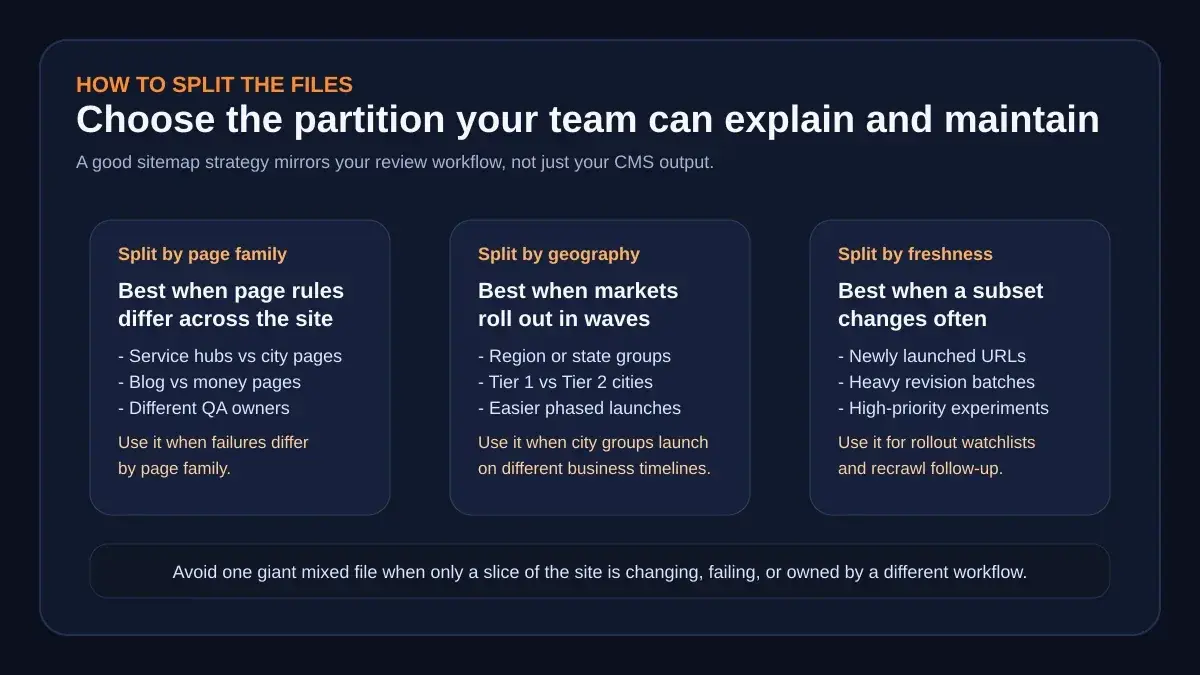 The best partition model is the one your team can explain, review, and resubmit without guesswork.
The cleanest multi location sitemap strategy usually starts with a sitemap index file that points to smaller, reviewable groups. Those groups do not need to look the same on every site. They need to reflect the way your content is launched and owned.
Three partition models tend to work best:
| Split model | Best use case | Why it helps |
|---|---|---|
| Page family | Service hubs, city pages, blog content, resource pages all behave differently | Makes failures easier to trace to one template family |
| Geography | State groups, metro clusters, or tiered city launches | Helps when markets launch in waves or have different business priority |
| Freshness | Newly launched URLs or heavily revised batches | Creates a watchlist for the pages most likely to need follow-up |
For most local SEO systems, page family is the best default. It maps neatly to the way content is governed. City pages are usually the largest and most failure-prone set, so they benefit from their own file or set of files. Editorial content can live separately because its indexing behavior and review cadence differ. Service hubs often deserve their own slice because they are closer to the core architecture and change less often.
Geography becomes useful when launches happen by market. If you are rolling out Texas this month and Florida next month, geography-based files can make it easier to monitor which region needs attention. Freshness-based files are useful when you have a big batch of new pages and want a temporary way to watch only the latest URLs until their crawl pattern stabilizes.
This is where AiPress's programmatic SEO approach offers the right framing. Its public page describes technical SEO, schema, and internal links being applied automatically across generated pages instead of being managed manually per template, and it gives a simple scale example: 50 locations by 10 services can already mean 500+ pages. Once you think in those page-family terms, it becomes obvious that the sitemap should not be treated as one flat dump.
A practical rule: split the files according to the units your team can actually review, debug, and ship again. If a file is too large or too mixed for someone to own with confidence, it is already too loose.
What every sitemap file should get right before you submit it
Partitioning is only the first half. The file itself still has to be clean.
Google's sitemap documentation is explicit about a few rules that become more important, not less, as the site grows:
- use fully qualified absolute URLs, not relative paths
- include the canonical URLs you want shown in search
- keep file size and URL counts within the allowed limits
- place the sitemap at the site root when appropriate
Those requirements sound basic, but they prevent common multi-location mistakes:
- Redirect URLs inside the sitemap. If old or intermediate URLs remain in the file, you create unnecessary cleanup work and fuzzier discovery.
- Mixed hostname versions. A sitemap that drifts between
http,https,www, and non-wwwvariants is telling Google a confusing story. - Template leftovers. Placeholder city URLs, invalid dates, or relative paths are easy to miss when content ships in batches.
- Oversized files without grouping. Once the file is too large, it becomes harder to reason about and slower to troubleshoot.
This is also where build-time governance beats launch-day patching. The AiPress AI websites page says its generation process produces URLs and navigation, optimized images, schema, meta tags, sitemaps, and robots configuration before launch. That is the right mental model. The sitemap should be an output of the same controlled system that creates your URL structure and page metadata, not a separate afterthought someone remembers the night before go-live.
If you are rebuilding a large local site, your checklist before submission should include:
- the correct canonical host format
- the right page groups in the index file
- no redirect or noindex destinations in the submitted set
- recent launch batches isolated if they need closer watching
- robots.txt references that point to the current file locations
The goal is not perfection on paper. The goal is a file set you would trust during a messy launch week.
How to monitor submitted sitemaps without guessing
 The important milestone is not “submitted.” It is “submitted, fetchable, parsed, and monitored.”
Teams often stop too early. They generate the file, submit it, and mentally mark the task complete.
Google's documentation says that is not enough. The Sitemaps report exists so you can see whether the file was fetched successfully, whether it has errors, and how many pages were discovered from it. The same help page recommends using a live URL inspection on the sitemap itself when things look wrong and specifically calls out the two fields you want to see: Crawl allowed = Yes and Page fetch = Successful.
That matters because the common failures are not theoretical:
- the file is blocked by robots.txt
- the submitted URL is wrong
- the sitemap can be fetched but has parsing errors
- the file stays broken long enough that Google eventually stops trying
Google also notes that the report shows only sitemaps submitted through the report or API, which is another reason deliberate submission is useful even when the file is listed in robots.txt. It gives your team a visible monitoring surface instead of relying on silent discovery.
The URL Inspection tool help page adds another useful operating rule: for larger or newer sites, it is a good practice to provide a sitemap, and if you want many pages indexed, your best move is to submit a sitemap rather than depend on one-by-one indexing requests. That is the difference between a scalable workflow and manual churn.
A simple monitoring loop looks like this:
- submit the sitemap index or updated sitemap group
- confirm the status in Search Console
- review discovered-page patterns
- run live URL inspection if a file slips into errors or fetch failures
- trace the issue back to the page family or rollout batch
- regenerate and resubmit the affected file
This is also why grouping the files well pays off. If the local pages file fails while the editorial file stays healthy, you know where to look first. The smaller the blast radius, the faster the recovery.
How AiPress treats sitemap work as part of build-time governance
If you want a useful benchmark for what "good" looks like, do not ask whether a sitemap exists. Ask whether sitemap work is tied to the same upstream rules that control URL structure, internal links, and review.
That is the pattern visible across AiPress's public material:
- the Miami plumbing case study describes tiered city architecture, service hubs, and deliberate internal-link flow
- the programmatic SEO page emphasizes automated technical SEO and sample-based review rather than template sprawl
- the AI websites page says new pages inherit SEO structure, sitemap updates, and internal linking patterns as the site grows
Together, those claims point to the right governance model for a multi-location build:
the sitemap should inherit structure from the architecture, not invent structure after the fact.
That matters for service-area SEO because the biggest sitemap problems usually start upstream:
- page families are unclear
- canonical rules are inconsistent
- launch batches have no temporary watchlist
- review is done page by page instead of by pattern
AiPress's public guidance around sample-based review is especially practical here. Its programmatic SEO page says teams cannot review 10,000 pages one by one and recommends reviewing five to ten pages from each template type instead. That same logic should shape sitemap governance. Review by pattern. Submit by pattern. Monitor by pattern.
When those patterns hold, the sitemap stops being a passive export. It becomes a reliable map of the site system you are actually running.
A post-launch checklist when discovery looks weak
 When a sitemap workflow breaks, the fastest teams group the problem into a familiar bucket instead of staring at the whole site at once.
If new pages are not surfacing the way you expected, work through this checklist before you assume a deeper SEO problem:
1. Confirm fetchability first
Use the Sitemaps report and, if needed, a live URL inspection on the sitemap file. If Google cannot fetch the file, nothing else matters yet.
2. Check whether the failure belongs to one page family
If only local pages are lagging, the problem is probably not your whole site. It may be a city-page template, a host mismatch, or one rollout batch that was generated with stale rules.
3. Review canonical hygiene
Look for redirect URLs, wrong host variants, or pages that should not be indexed at all. Multi-location sites are especially vulnerable when old migration rules and new launch rules overlap.
4. Inspect the page set, not just the file
If the sitemap looks valid but discovery still feels thin, test sample URLs from the affected group. The URL Inspection tool is useful here because it surfaces whether Google can fetch the page, whether indexing is allowed, and whether a referring sitemap is visible.
5. Decide whether this is a content problem or a systems problem
Not every weak discovery pattern is caused by the sitemap. But if the same page family keeps appearing in fetch failures, wrong canonicals, or broken rollout batches, you are probably looking at a systems problem, not a one-off page problem.
That distinction is why operational sitemap strategy matters so much. It gives you a structured way to separate indexing noise from recurring architecture mistakes.
FAQ
When should a multi-location site split its sitemap?
Split it when the URL set is approaching Google's size limits, when different page families need different review owners, or when a single mixed file makes debugging too slow. For many service-area sites, the best moment is well before the hard technical limit, because governance breaks before file size does.
Should city pages and blog posts live in the same sitemap?
They can, but they often should not. City pages and editorial content usually change on different cadences, have different owners, and fail for different reasons. Separate files give you cleaner monitoring and a smaller troubleshooting radius.
Is submitting a sitemap enough to get all pages indexed?
No. Google says submission is only a hint, not a guarantee. A good sitemap improves discovery and monitoring, but page quality, canonical clarity, crawl access, and overall site health still matter.
Is a sitemap plugin enough for a large local site?
Sometimes, but only if it produces clean canonical URLs, exposes the files correctly, and fits your review workflow. The larger the site becomes, the more important it is that the sitemap reflects architecture and ownership instead of plugin defaults.
What is the fastest way to debug a failing sitemap?
Start in the Sitemaps report, identify whether the issue is fetch-related or parsing-related, then run a live URL inspection on the sitemap or sample URLs from the failing group. That narrows the issue faster than guessing across the entire site.
Next steps
If your team is rebuilding a local SEO site, do not wait until launch week to think about sitemap governance. Decide early how URLs will be grouped, who will review each group, and how you will monitor submission results after go-live.
If you want that logic built into the site system instead of bolted on later, start with plan your AI website. That conversation is where page families, launch ownership, and sitemap governance should be scoped before the rebuild is underway.
Crawl behavior and indexing speed vary by site. Confirm changes in your own Search Console property before treating a sitemap update as complete.