
The Local SEO Content Calendar That Does Not Become Thin Content
 A useful local SEO calendar should decide whether a topic gets published, refreshed, merged, held, or rejected before it reaches draft one.
A local SEO content calendar only helps if it tells your team what deserves a page, what deserves a refresh, and what should not be published at all.
That sounds obvious. It is also where a lot of local content plans quietly fail.
Teams fill a spreadsheet with city ideas, seasonal ideas, FAQ ideas, and service ideas. Then they start publishing because the calendar exists. A few months later they have more URLs, more overlap, more maintenance, and less confidence that each page still earns its place.
That is not a calendar problem. It is a governance problem.
Google's helpful-content guidance gives the right lens for this. The question is not whether you can keep publishing. The question is whether each new asset adds original value, serves a real audience, and leaves the reader with a satisfying result.
For AiPress, that matters because the company already treats scale as a system. On its Programmatic SEO with AI page, the framing is blunt: define templates, data, and rules first. On its AI Websites page, the review step is equally clear: preview every page, compare it with the old site, request changes, and verify accuracy before anything goes live.
That is the model a serious calendar should follow.
Why local content calendars drift into thin content
Most local calendars do not break because the team runs out of ideas. They break because the ideas are disconnected from proof, refresh logic, and business intent.
The usual warning signs look like this:
- every city gets the same post concept whether demand exists or not
- seasonal topics repeat without new evidence
- support articles do not point toward money pages or core services
- drafts are approved because the topic sounded good in a meeting
- old posts stay live even when a refresh or merge would be smarter
Google explicitly warns against adding or removing large amounts of content just to make a site seem fresh. That point matters more than many marketers admit. If the only reason a topic exists is that the calendar had an empty slot, the page is already starting from the wrong "why."
AiPress's own language around scale reinforces the same lesson from the operational side. The programmatic SEO page says the goal is unique, valuable pages at scale, not template output with swapped keywords. It also says pages that do not pass review should not publish.
A useful calendar, then, is not a publishing quota. It is a decision framework with veto power.
The four inputs that should shape every topic
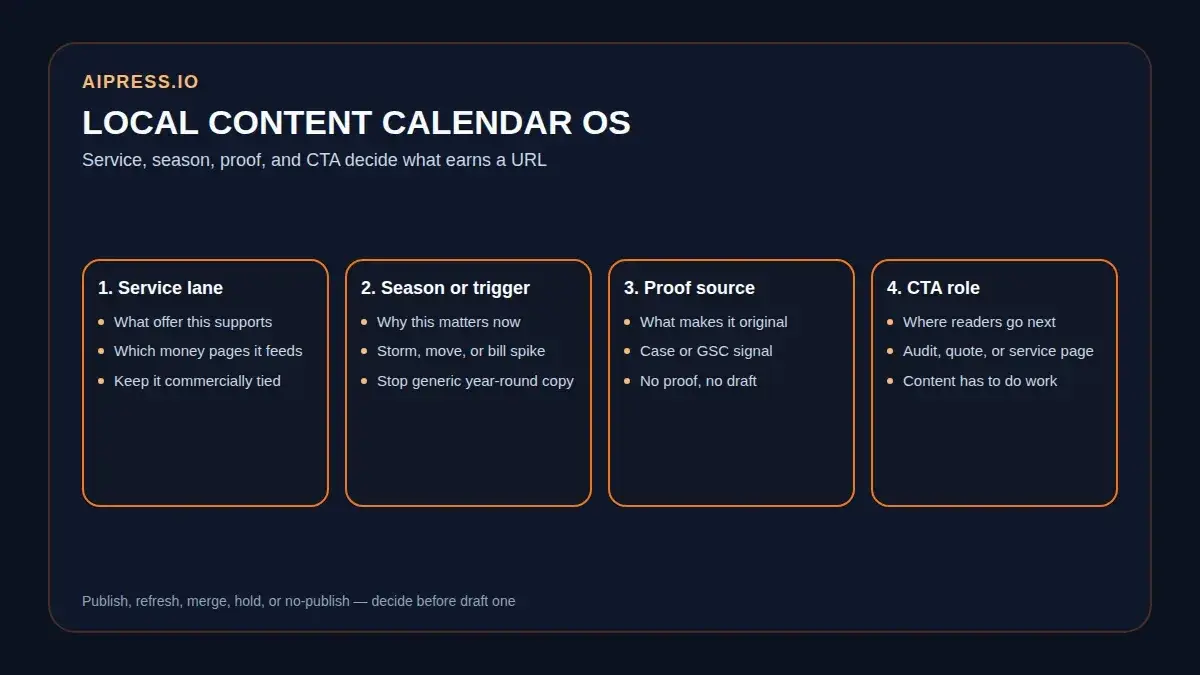
Before you assign a publish date, every local topic should answer four questions:
- Which service or commercial intent does this support?
- Which season, trigger, or buying moment makes it timely?
- Which proof asset makes it worth reading now?
- Which CTA should this page naturally lead to?
If one of those columns stays empty, the topic is probably not ready.
Here is the simplest way to think about it:
| Input | What to capture | Why it matters |
|---|---|---|
| Service | the exact service, page set, or offer this topic supports | keeps the article tied to revenue and page architecture |
| Season / trigger | summer surge, storm prep, tax deadlines, moving season, HOA budgets, inspection windows | stops you from publishing the same generic advice all year |
| Proof | case study, real workflow, customer objection, service-page gap, Search Console signal | gives the article an evidence source instead of a recycled angle |
| CTA | audit, estimate, preview, quote, contact, service-page visit | makes the content do useful work after the read |
This is where many local teams overcomplicate the process. You do not need 40 columns. You need the few that force editorial honesty.
For example:
- A plumbing company might pair water heater service with first summer utility-bill spikes, proof from real service calls, and a CTA toward repair or replacement pages.
- A restoration brand might pair humidity or storm prep with hurricane season, proof from moisture-check workflows, and a CTA toward inspection or emergency response.
- A real-estate team might pair listing prep with back-to-school relocation windows, proof from seller checklists, and a CTA toward a listing consultation.
The topic becomes stronger because it stops being "another post about X." It becomes a page tied to a real moment, a real service, and a real next step.
How to map service, season, proof, and CTA into one calendar
The easiest way to avoid filler is to build the calendar from one commercial lane at a time.
AiPress's Miami plumbing case study is a useful reminder of why. The project scaled around 39 cities and 14 services, but not every city got equal treatment. Tier 1 cities received deeper content and stronger internal-link support. Blog posts existed to support money pages, not to compete with them.
That is the right mental model for a local calendar too.
 Service, season, proof, and CTA belong in the calendar before a publish date does. Empty columns are a warning sign.
Start with one anchor topic, then define the support pieces around it.
| Asset type | Example | Proof needed | CTA role |
|---|---|---|---|
| Anchor guide | "When to replace a water heater before peak summer demand" | service-page expertise, pricing caveats, real decision factors | move readers to the core service page |
| Diagnostic checklist | "Signs your water heater issue needs same-day service" | call patterns, common failure signs, scheduling reality | push toward booking or calling |
| Seasonal explainer | "What summer demand changes for water heater waits and maintenance" | seasonality, operations notes, real workload patterns | support urgency or inspection CTAs |
| Comparison / decision piece | "Repair vs replacement for a 12-year-old unit" | threshold logic, cost drivers, exceptions | route to consultation or estimate |
That approach does two useful things at once:
- It gives the anchor page room to be comprehensive.
- It gives support pieces a reason to exist beyond "we have not posted this week."
It also helps you avoid cannibalization. If the anchor owns the broad decision, the support assets can own timing, diagnostics, objections, or narrower scenarios without trying to outrank the anchor for the same intent.
One more rule matters here: every support piece should have a defined destination. If it does not clearly support a money page, a service cluster, or a conversion path, it may belong in the backlog instead of the calendar.
When to refresh instead of publishing something new
This is where the calendar earns its keep.
Search Console's reports make the refresh decision much easier than teams often pretend. The reports overview explains that you can use:
- Insights to spot top and trending content
- Performance reports to review clicks, impressions, CTR, and position by page or query
- Page indexing to see why pages are or are not indexed
Those three signals already cover most refresh calls.
Choose a refresh before a new article when:
- the existing page already earns impressions for the topic family
- the topic gap is mostly missing proof, missing specifics, or stale examples
- multiple older posts are splitting one intent
- a page is still relevant commercially, but weaker than it should be
Choose a new article when:
- the query represents a distinct service, season, or objection
- the existing page would become bloated if you force everything into it
- the CTA, proof set, or target audience genuinely changes
- Search Console shows a demand pattern your current pages do not address well
The most useful calendar note you can add is often not "publish new." It is "refresh old page with new proof and relink support posts."
Google's warning against fake freshness matters here. Changing a date and rewriting the intro is not a refresh strategy. A real refresh changes the evidence, the usefulness, or the decision support on the page.
The review gates that stop weak drafts early
AiPress says teams cannot review 10,000 pages one by one, so they should sample by pattern and block weak outputs before they publish. That principle scales down perfectly to a calendar.
Your review gates should answer:
1. Does the topic have a real audience right now?
Google asks whether the content serves an existing or intended audience that would still find it useful if they came directly to the site. If the topic only exists because "SEO says publish more," that is a warning sign.
2. Is there proof on hand?
Proof can mean:
- a case study
- a service-page gap you can fix honestly
- a repeated customer question
- a Search Console pattern
- a workflow or checklist your team actually uses
If the draft has no proof column, the page may become a polished generalization.
3. Is the next step obvious?
AiPress's AI Websites page makes an important operational point: review every page before launch, and make sure the page fits the system around it. A calendar should do the same thing upstream by asking where the page sends readers next.
4. Does the topic deserve its own URL?
If the answer would mostly repeat an existing page with slightly different wording, it probably belongs as a refresh, merge, or subsection instead.
 Review gates are what stop a calendar from becoming an assembly line. If the topic lacks proof, audience fit, or a clean next step, it should not survive to draft one.
A practical rule here is to add a no-publish state to the calendar. Some ideas should move to:
- refresh queue
- merge queue
- proof-needed queue
- seasonal hold
That is not lost productivity. That is editorial discipline.
How to turn one anchor topic into support pieces without cannibalizing yourself
The safest way to expand a local library is to build support around one strong anchor instead of publishing five posts that all want the same click.
Start with an anchor topic that owns the broad decision. Then split support assets by function:
| Support role | Better question to answer |
|---|---|
| objection handling | what makes people hesitate or delay? |
| seasonal timing | why does this matter now? |
| diagnostic checklist | what should readers verify before they call or buy? |
| comparison | what alternatives are readers weighing? |
| process explainer | what happens next if they move forward? |
This creates a cleaner internal-link pattern too.
AiPress's plumbing case study says blog posts should support money pages, and that city pages need a disciplined link budget because they are high-intent conversion pages. That is a useful reminder for any calendar: not every post deserves equal link prominence, and not every supporting article should link everywhere.
If you keep the support roles distinct, the calendar becomes easier to maintain:
- the anchor owns the broad search intent
- the support assets answer narrower sub-decisions
- the CTA language stays aligned to the buying stage
- refreshes happen at the lane level instead of as random one-off edits
That is how a library starts to feel cumulative instead of cluttered.
 A good library compounds when one anchor owns the broad decision and support pieces answer narrower jobs without collapsing into repetition.
FAQ
How many topics should a local SEO calendar hold at once?
Enough to keep the next few cycles clear, not so many that weak ideas survive just because they were typed into a spreadsheet months ago. A smaller, proof-backed queue is usually stronger than an oversized backlog.
What is the fastest way to spot a thin-content risk before drafting?
Check whether the topic has a distinct service angle, a timely trigger, a proof source, and a real CTA path. If one of those is missing, the topic probably needs refinement, proof gathering, or a refresh decision instead of a new post.
Should every local service or city get its own supporting article?
No. AiPress's own local case-study architecture prioritizes cities by value rather than treating every location equally. Your calendar should do the same. Some lanes deserve deeper support. Others deserve a stronger core page and no extra article yet.
What should I review every month?
Review top and trending pages, pages losing impressions or CTR, pages excluded from indexing for reasons that matter, and support articles that no longer point to the strongest commercial destination.
Next steps
If your current calendar keeps producing articles that feel interchangeable, do not solve it by brainstorming harder.
Solve it by tightening the operating system:
- define the service lane
- define the season or trigger
- attach a proof source
- assign a CTA role
- decide whether the topic is new, refresh, merge, or no-publish
That is the shift from "content planning" to content governance.
If you want the site structure underneath that calendar to stay as disciplined as the editorial plan, explore Programmatic SEO with AI, see how AI websites keep new pages inside a cleaner publishing system, or plan your AI website when you are ready to test the workflow on your own stack.
This article is educational, not legal or platform-policy advice. Confirm major content, indexing, and publishing decisions against your own Search Console data and the latest Google documentation before changing production pages at scale.